It's Tuesday. A finished 1,800-word guide sits on your site, and about forty people have read it. Meanwhile three social accounts sit quiet, one comment from Sunday is still unanswered, and a half-written caption for LinkedIn has been open in a tab since Friday.
That gap isn't a creativity problem. It's a planning problem. Content keeps getting made, and distribution keeps happening late, separately, by whoever has a spare twenty minutes.
Social media and content marketing only pay off when they run as one plan: one calendar, one set of measures, a named owner for every stage. Here's how that plan works, who does what, and where automation fits without handing over your judgment.
Table of Contents
- What Social Media Adds to Content Marketing
- Who Owns Each Stage of the Shared Plan
- How to Turn One Core Asset Into Network Posts
- Which Formats Earn Attention and Where to Post Them
- Platform Limits That Break Automated Publishing
- Why Replies Count as Part of Content Return
- How to Keep AI Drafts Trustworthy
- Your First Seven Days With One Shared Plan
What Social Media Adds to Content Marketing
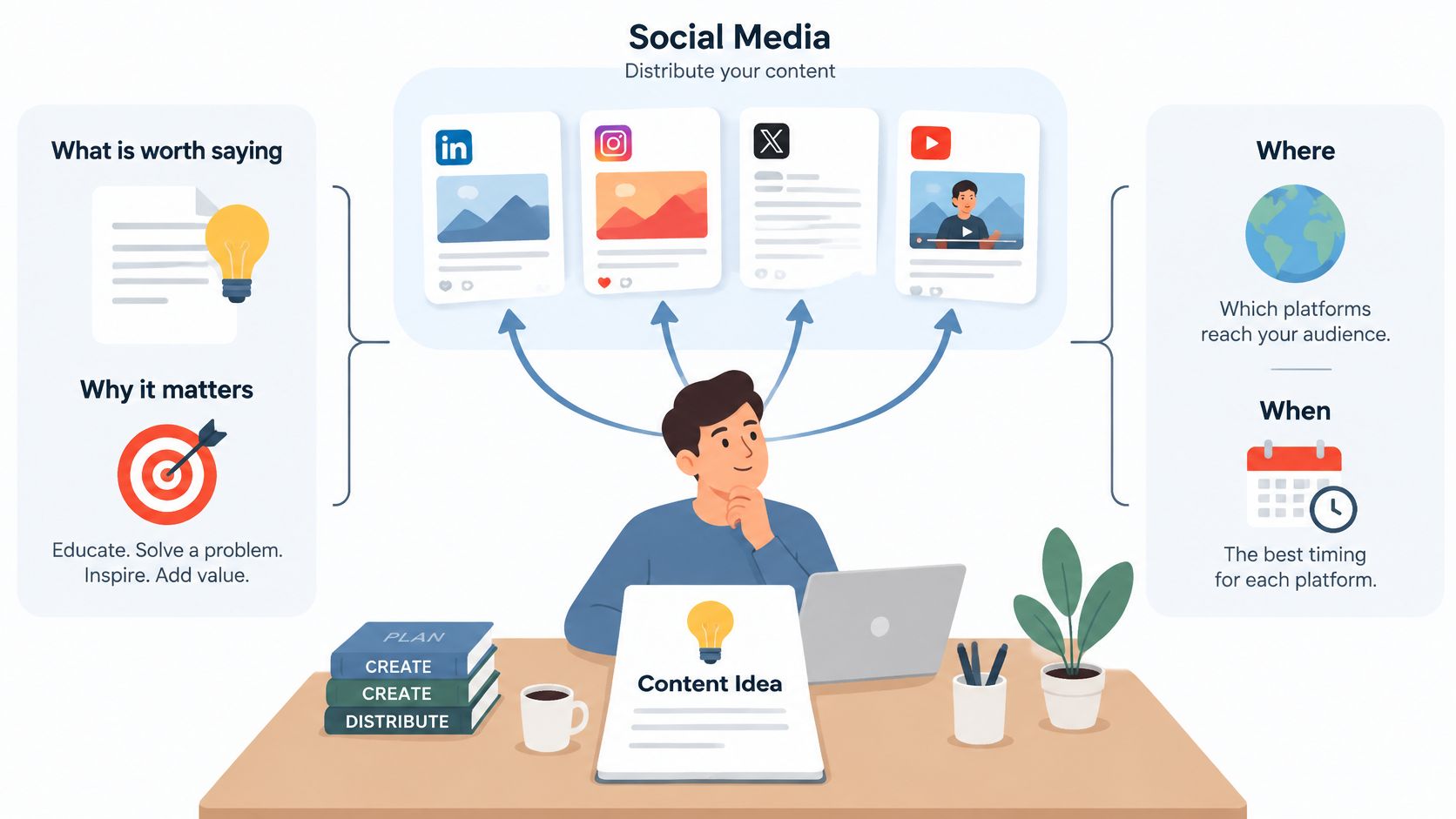
Social media is the distribution layer of content marketing. Content marketing decides what's worth saying and why. Social media decides where and when each version reaches a person, and with what framing.
Think of a letter. Writing it is content work: the argument, the evidence, the offer at the end. Delivering it is social work: which routes, which day, which envelope. A letter nobody delivers is never read, however strong the opening sentence.
Three media types sit inside that delivery layer, and social touches all of them at once:
- Owned media is what you control: your website, your newsletter, your profiles, the posts you publish yourself.
- Earned media is what other people produce about you: shares, mentions, reviews, replies, tags.
- Paid media is what you buy: boosted posts, in-feed ads, sponsored placements.
A single post can be all three in one week. You publish it (owned), someone shares it (earned), and you put budget behind the best-performing version (paid). Treating those as three separate projects is how teams end up with three half-finished campaigns.
The scale explains why this needs a system. Statista's social media advertising outlook puts worldwide spend in that market at about US$276.70 billion in 2025, and separate global estimates counted more than 5.4 billion social media users in 2025. Huge reach, scarce attention. One idea published in one format on one network gets seen by a sliver of the people who would care about it.
That's the argument for adapting a core asset into several formats rather than writing five unrelated posts. Teams that publish steadily tend to build a pipeline instead of a burst, and Outrank's guides for scaling organic content are a useful next read on sequencing that pipeline across channels.
Working rule: content sets the message, social sets the delivery, and both get planned on the same calendar before either team starts producing.
Who Owns Each Stage of the Shared Plan
The most common failure isn't laziness. It's two teams reporting different numbers to the same leadership meeting. The social lead brings reach and likes. The content lead brings page views and downloads. Nobody can say which post produced which sign-up, so the meeting ends with a promise to align and nothing changes.
A stage table fixes that. One owner per row, one measure per row, agreed before the next batch of content goes out.
| Stage | Content marketing job | Social media job | Measure to share |
|---|---|---|---|
| Idea and research | Choose the core topic and audience question | Test hooks and questions in short posts | Replies and saves per post |
| Asset creation | Produce the canonical piece such as a guide, study or video | Cut excerpts, clips and quotes from the asset | Visits to the asset from each excerpt |
| Distribution | Decide which formats each network receives | Publish on schedule for each network | Reach and engagement by network |
| Conversation | Write response standards and answers to common questions | Reply to comments and messages | First-response time |
| Conversion | Define the owned destination and offer | Link each post to the page with a clear reason | Sign-ups or leads from tagged social links |
| Reuse | Refresh the asset for evergreen use | Recycle top posts with new angles | Results of recycled posts over 30 days |
Three rows cause most of the friction in practice.
- Idea and research: content owns the question, social owns the test. If the social team posts three hooks and the winning one gets ignored, the asset is built on a guess.
- Asset creation: the canonical piece is one thing, not six. Write the guide or record the video once, then cut from it. Teams that write the post and the article separately do double work and drift in tone.
- Conversation: content writes the answers to predictable questions before publishing. Social handles the rest in real time. Without that split, replies stall whenever the one person who knows the product is offline.
The measure both teams report
Reach and page views aren't the same story, so pick a joining metric: visits and sign-ups that arrive from social links, tagged so each one traces back to a specific post and asset. When both teams report that number, the argument about which channel "works" ends.
Copy the table into a shared sheet this week. Put one name against each row, including the rows nobody currently owns. Agree the measure in writing. A plan with unnamed owners is a wish list.
How to Turn One Core Asset Into Network Posts
One asset, several versions, staggered over days. That routine below works whether the asset is a guide, a webinar recording or a product comparison.
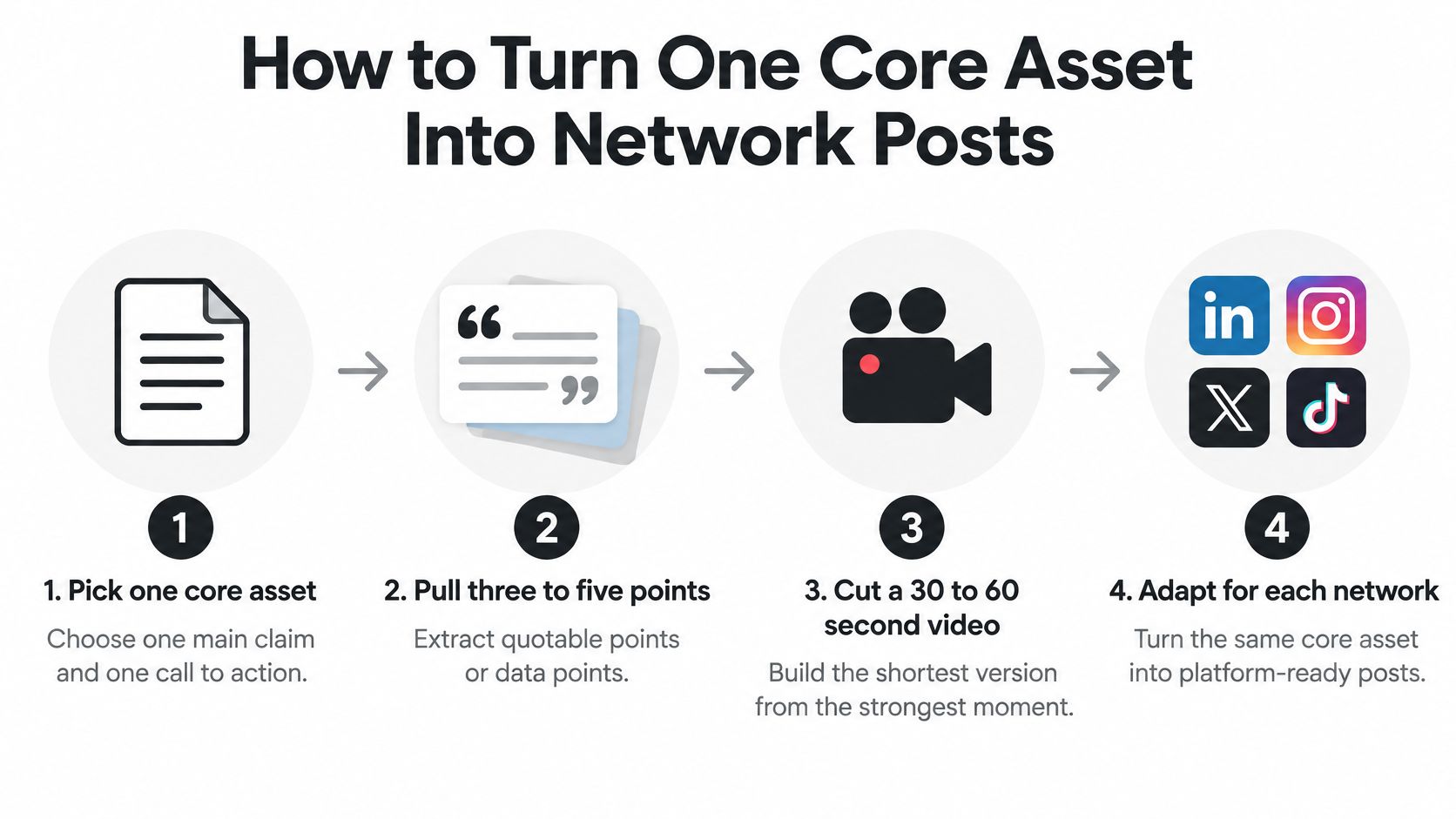
- Pick one asset with one main claim and one call to action. Two claims split the audience's attention and split your measurement. If the asset argues that onboarding speed drives retention, every post version carries that argument and points to the same page.
- Pull three to five quotable points or data points. These become separate posts, not a summary of the whole piece. The common slip is pulling ten points and drowning the calendar in near-duplicates.
- Cut a 30 to 60 second video from the strongest section. Record the section again while looking at a camera, or screen-record the key moment. A clip with one idea outperforms a two-minute tour of everything.
- Write a thread or short post that opens with a claim from the asset and links back. The claim earns the click more than "new blog post" ever will. Keep the link at the end unless the platform rewards early clicks.
- Build a carousel of the key steps for visual networks. One step per slide, six to eight slides, last slide holds the link. Each slide should make sense to someone who never reads the caption.
- Adapt length to the network. X posts cap at 280 characters, LinkedIn posts allow up to 3,000, and Instagram captions allow 2,200. Writing once and pasting everywhere is the fastest way to look automated.
- Schedule across several days, not one morning. Publishing every version at once spends the attention of one audience in one hour. Space versions three to five days apart so the asset gets several separate chances.
- Review at 7 and 30 days and record which version sent the most visits. Tagged links make this possible. Without tags, the only honest answer is a shrug.
Here's the flow that matters: a canonical piece stays canonical, and everything else is a derivative that links back to it. If syndication is part of your mix, SemDash's guide to content syndication covers where the same rules apply to republishing partners.
Say a 1,800-word onboarding guide becomes a six-post X thread, one LinkedIn post built on a single data point, a 45-second video and a six-slide carousel, all linking to the guide with tagged URLs. That's four derivative formats from one writing job. Each one reaches a different slice of the audience on a different day, and each one reports its own visits. The full pattern is the same one described in long-form once, short everywhere, which is worth reading before you build your second batch.
Which Formats Earn Attention and Where to Post Them
The Content Marketing Institute and MarketingProfs' 2025 B2B benchmark study, drawn from 1,186 global responses, ranked formats by how well they performed. Video came first, named most effective by 58% of respondents. Case studies or customer stories followed at 53%, then e-books and white papers at 45%, research reports at 45%, and short articles or posts at 43%.
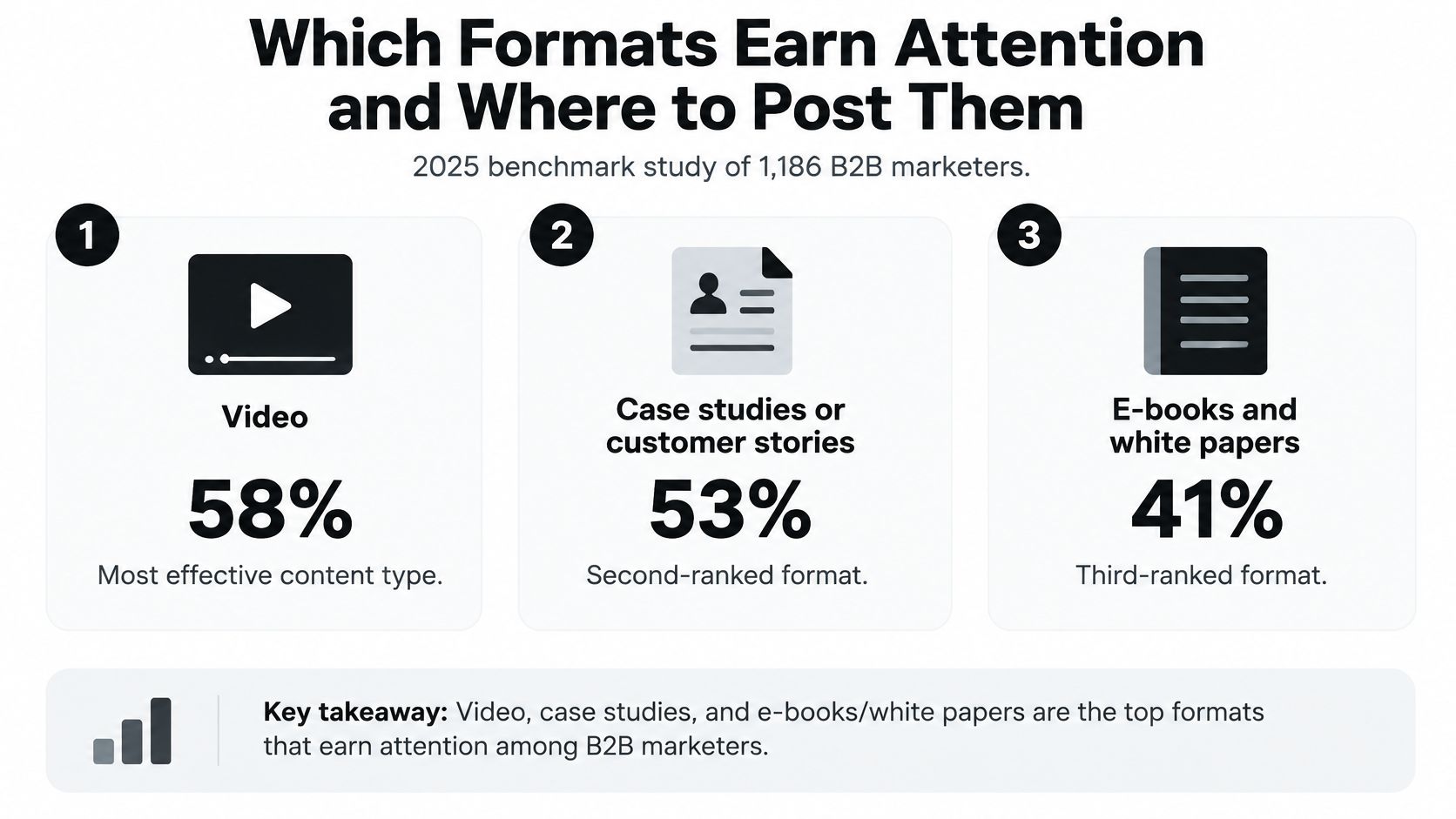
| Content type | Share selecting it as most effective | Suggested social use |
|---|---|---|
| Video | 58% | Cut a 30 to 60 second clip from the strongest section |
| Case studies or customer stories | 53% | Carousel with one result per slide |
| E-books and white papers | 45% | Post the three key findings as separate posts |
| Research reports | 45% | Short video that explains one finding |
| Short articles or posts | 43% | Native post that links to the full piece |
How to read the ranking without overfitting it
The study surveyed B2B marketers, so it shows direction rather than a rule for every audience. A format that ranks well overall can still flop on one network, and a strong network can't rescue a format nobody wants.
The network data in the same study points the same way: 68% of B2B marketers increased their use of LinkedIn, 31% increased YouTube, 27% increased Instagram, 20% increased Facebook, and only 9% increased TikTok. That's a picture of where business attention was moving, not a verdict on TikTok for a consumer brand.
Pair each format with the network where it fits. A case study becomes a LinkedIn carousel with one result per slide, because LinkedIn readers scan for evidence. A research report becomes a short video explaining one finding, because video is where that audience will watch an argument play out.
Plan for the next quarter: pick two formats and two networks, run them for 90 days, and compare results against your own baseline before adding a third of anything.
The discipline gap is the part many teams skip. In the same benchmark, 87% of B2B marketers said content marketing helped create brand awareness in the previous 12 months, yet only 29% of marketers whose organizations had a documented content strategy rated that strategy extremely or very effective. Formats and networks only pay off when the plan behind them is written down, assigned to a person and reviewed on a schedule.
Platform Limits That Break Automated Publishing
A publishing schedule works like a loading dock. The calendar says when a truck leaves, but the network decides whether the package is accepted. Check those API rules before handing publishing to a scheduler or an AI agent. They are ordinary operating limits, not rare edge cases, and they explain many jobs that "should have posted" but did not.
| Platform | Limit or rule | What it changes in your schedule |
|---|---|---|
| 100 API-published posts per rolling 24 hours per account | Spread a backfill across days and reserve room for same-day posts | |
| Media must be hosted on a publicly accessible server at publish time | Check that the file URL resolves before the job runs | |
| One carousel holds up to 20 images, videos or both | Treat a carousel as one grouped job, not separate uploads | |
| JPEG maximum 8 MB, aspect ratio between 4:5 and 1.91:1 | Crop a separate version for feed and other placements | |
| Containers expire after 24 hours | Create the container close to publish time, not days ahead | |
| TikTok | Unaudited clients publish in private mode only | Confirm public visibility instead of trusting a success response |
| TikTok | Six requests per minute per user access token | Throttle per token, not per account or per app |
| TikTok | Daily cap on uploads waiting for creator approval | Track pending uploads and clear the queue before bulk posting |
| TikTok | Three-minute videos for all creators, five or ten minutes for some | Read the creator info endpoint and check duration first |
| TikTok | MP4, WebM or MOV, 23 to 60 FPS, 4 GB maximum | Reject or re-encode files before the job is queued |
The Instagram content publishing documentation sets the 24-hour post ceiling and the public-server requirement. Instagram's media endpoint reference holds the 8 MB JPEG ceiling, the 4:5 to 1.91:1 ratio window and the 24-hour container expiry. On TikTok, the Content Posting API reference covers private-mode posting for unaudited clients, the six-requests-per-minute token limit and the daily cap on uploads awaiting approval, while the content sharing guidelines set duration and file rules.
Each constraint turns scheduling from a timestamp into a validated job. Media gets checked, quotas get tracked, and a slow approval queue gets cleared before a bulk run. That validation belongs in the same pipeline as writing and repurposing, because a post that fails at the network never reaches the reply stage.
Build the check into the handoff. The writer or agent prepares the platform versions, the media library holds the approved files, and the scheduler confirms format, token limits and visibility before release. If the run is large, batch scheduling jobs gives the team a practical way to group work without losing those checks. FoPost can then support publishing across 33 platforms, with scheduling, automations and evergreen recycling kept in one workspace.
Why Replies Count as Part of Content Return
A post isn't finished when it publishes. That assumption is what turns a good week of reach into silence and lost demand.
The 2025 Sprout Social Index, which surveyed more than 4,000 consumers, 900 social practitioners and 300 marketing leaders across the United States, United Kingdom, Canada and Australia, found that nearly three-quarters of consumers expected brands to respond within 24 hours or sooner. That number reframes replies as a service commitment, not a nice-to-have.
Picture a post that pulls 200 questions and gets no answer for two days. The reach happened. The return didn't. Attention that arrives and finds nobody home becomes a bad first impression that's hard to undo.
Four numbers to record for every post
- Time received: when the comment or message landed, so age is measurable rather than remembered.
- First-response time: how long until a real person or an approved draft answered.
- Resolution time: when the question was settled, not just acknowledged.
- Outcome: the click, lead, purchase or retention action that followed.
Set queue priority by intent. Purchase questions and product problems go first. Low-value mentions can wait until the next sweep. The benchmark worth reporting isn't response volume, it's the share of high-intent conversations that get a correct first response within your SLA, split by network and campaign.
Practical rule: set a response target for your top two networks, route each queue to a named owner, and flag any thread that reaches 20 hours without a reply.
That flag is a simple trigger no one has to remember. For the wider picture of how replies feed retention rather than just satisfaction, see this guide to social media and customer relationship management.
How to Keep AI Drafts Trustworthy
A 2026 survey of social media users in the United States and United Kingdom found that 91% expected brands to disclose AI use in marketing, while trust in AI content split by market: 35% of U.S. respondents trusted it, compared with 28% in the U.K. That gap makes approval a publishing step, not a cleanup task. A draft can be fast, fluent and still wrong for the audience reading it. Treat the AI draft like a second-shift worker. It can prepare the box, but a named person seals it before it leaves the warehouse.
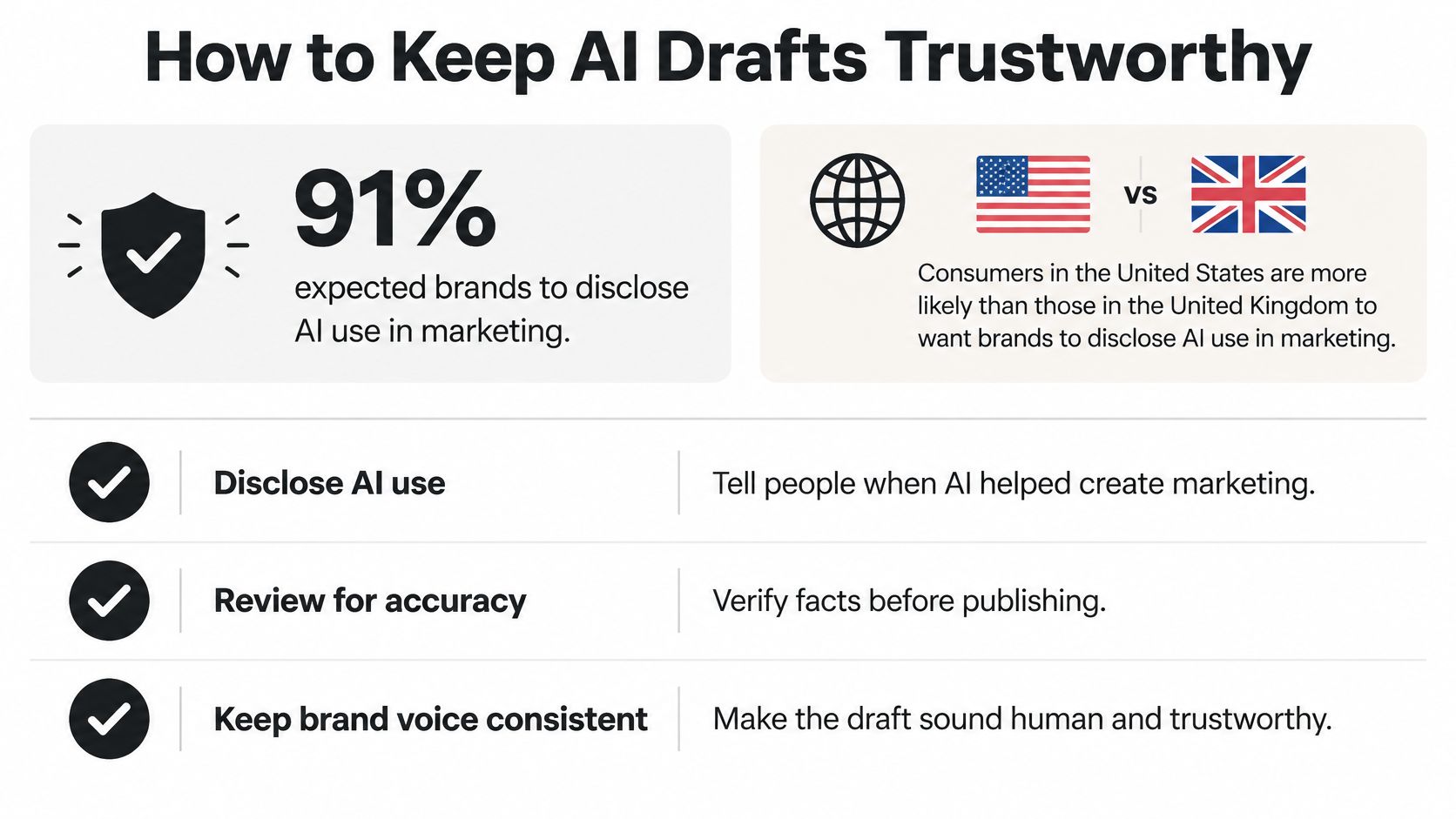
The answer isn't a larger prompt library. It's an approval policy that says who signs off on what, before the draft reaches a scheduler and before replies start using the same claims.
The approval policy in five rules
- Label AI involvement where your audience expects it. A short line at the end of a post costs nothing and matches the disclosure expectation many audiences now hold. Put it where the reader will see it, not where it disappears under a platform menu.
- Require a human to approve factual, medical, financial, legal or sensitive claims. A person checks the number, the date and the context before it goes out. This reviewer owns the final wording, not just a quick thumbs-up.
- Keep a source for every number before posting. If the draft can't point to where a figure came from, the figure comes out. The same rule applies when a claim shifts slightly from one network version to another.
- Run an edit pass for voice. Model output drifts toward a flat register. One editing pass keeps the account sounding like the same organisation every week, even when the first draft came from a chat planner or a repurposing tool.
- Compare against human-written controls. Track saves, qualified replies, conversions and correction rates for AI-assisted posts next to human-written ones, not just reach. That comparison shows whether speed is helping the plan or weakening it.
Step five is where teams often stop short. They count volume, because volume is easy to see. They skip the question of whether AI-assisted posts slowly erode credibility, because that takes a control group and a longer window. Set the comparison at the start of the quarter, when the posts are still easy to tell apart. Keep the approver, the source and the disclosure in the same record as the scheduled post. Then a question in the inbox can be answered from the approved version, rather than reconstructed from memory.
Test to run this month: publish five AI-assisted posts and five human-written ones on the same network, then compare qualified replies and correction requests after 30 days.
Your First Seven Days With One Shared Plan
A workable week looks like a production line. Day 1 picks the raw material, Day 2 cuts it into pieces, and Day 7 puts the first finished piece into the world. The rest of the week assigns names, checks and limits, so social posting sits inside one content plan instead of becoming a separate chore.
Day 1: choose one core asset. One main claim, one destination page. If you can't state the claim in a sentence, the asset isn't ready to distribute.
Day 2: cut the derivatives. Three to five quotable points, one 30 to 60 second clip, one carousel. Note which version each network gets so nobody re-decides on the day.
Day 3: fill in the stage table. One name per row, including conversation and conversion. Confirm the tagged links from the table are applied, so measurement starts on post one rather than week six.
Day 4: set the reply target. Pick your top two networks, name the owner of the queue, and agree on the flag that surfaces an unanswered thread before it ages out.
Day 5: write the AI rule. Who approves factual and sensitive claims, and where disclosure appears. Two sentences in a shared doc beats an argument in the middle of a campaign.
Day 6: run the compliance pass. Check each version against the limits of its network: duration, file size, aspect ratio and quota. A post that fails validation looks identical to a post that was never scheduled.
Day 7: publish one version and schedule the rest across the next fourteen days on a single calendar, then book the 30-day review against the shared measures.
When drafts get pasted between tools, formatting breaks in scheduling fields, and the Simple Unmark guide for editors is a useful way to strip stray styling before a draft goes into a queue. Keep the cleaned version beside the original so the person approving the post can see exactly what changed.
FoPost fits the week when the same team needs one workspace for writing, adapting, scheduling, publishing and measuring. Its Blog-to-Social Repurposer turns the URL from Day 1 into platform-optimized threads, short-form posts and carousels. The calendar works like a control board: posts are dragged into place, then publish automatically. FoPost supports 33 platforms, including Instagram, LinkedIn, X, TikTok, YouTube, Facebook, Threads, Pinterest, Bluesky, Mastodon, Discord and Reddit.
Start with Day 1 today: pick the asset you already have, state its one claim, and name the page it should send people to. Then connect two free accounts in FoPost, draft the week's versions, use unlimited posts and scheduling, and keep every approval in one calendar before anything goes live.