You've got eleven posts to write and four accounts to fill. So you block out Sunday evening, write the whole week in one sitting, and queue it. By Wednesday, one post never published, a second published twice, and a third went live at 4 a.m. because the time zone was wrong.
None of those failures came from bad writing. They came from treating a batch as a pile of delayed requests instead of a job queue with stages, caps, and failure modes of its own. Batch scheduling jobs well is mostly about the boring parts: what got approved, when the media container was created, and what happens on the second retry.
This guide covers the workflow, the platform caps that set your batch size, the duplicate and time zone traps, and how to hand the whole thing to an AI agent without losing control of what ships.
Table of Contents
- Batch Scheduling Explained From Draft to Published Post
- Platform Posting Limits That Set Your Batch Size
- How to Batch Schedule a Week of Social Posts
- Preventing Missed and Duplicate Posts
- Keeping Approval in the Batch Workflow
- Batching Posts With an AI Agent
- Running Batches Through an API or Automation Tool
- Schedule Your First Batch This Week
Batch Scheduling Explained From Draft to Published Post
Batch scheduling means preparing a group of social posts in one sitting, then letting each one publish at its set time without reopening every network. Think of a prep kitchen. The team cooks on Sunday and serves all week. The cooking is the batch. The serving is the scheduler.
The split matters because two different jobs are involved. A creator decides what to say, which network gets it, and when it goes out. A publishing worker handles exact delivery: it picks the post up at the right minute, calls the network, and records what happened. Every stage before Publish is a decision a person makes. Publish is the only stage a machine owns outright.
The six stages of a batch
| Stage | What Happens | Who Decides |
|---|---|---|
| Collect | Gather ideas, clips and captions in one list | Creator |
| Adapt | Rewrite each draft for each network's length, tone and hashtags | Creator or AI draft, reviewed by creator |
| Approve | Check exact text, network, media and time | Human reviewer |
| Schedule | Place approved posts on the calendar or queue | Creator releases the schedule |
| Publish | Post at the set time or on queue release | Publishing worker at the set time |
| Measure | Pull analytics to shape the next batch | Creator reviews results |
That structure is older than social media. The principle was worked out for mainframe operations in the mid-1950s, when a batch monitor loaded one program, ran it, regained control, and started the next, as this operating systems lecture on batch scheduling describes. Submit work in advance, organize it into a queue, allocate scarce resources by an execution policy.
The social version keeps the same shape. The scarce resource is your attention and each network's rate limit. The execution policy is your approval rule. A batch is only as safe as its approval stage, because everything downstream runs without you in the room.
Platform Posting Limits That Set Your Batch Size
Each platform limit works as its own queue. It isn't one shared quota, so a batch that clears one network can stall on the next. Take X first. The platform limits cheat sheet for schedulers reports that X allows up to 100 post requests per user every 15 minutes and 10,000 per app every 24 hours.
Send 120 X posts in one release and the arithmetic is unforgiving. The first 100 go out, and the last 20 have to wait for the next window. If all your accounts sit under one developer app, they also share that daily app ceiling, which is where multi-brand setups get caught.
| Network | Limit | Window | Planning Rule |
|---|---|---|---|
| X | 100 post requests per user | Every 15 minutes | Throttle per connected account |
| X | 10,000 post requests per app | Every 24 hours | Shared by all accounts using one app |
| TikTok | 6 requests per minute per user token | Per minute | No published daily post cap |
| YouTube | 10,000 quota units per day | Daily | Uploads also capped at 100 per day |
| 100 API-published posts per account | Moving 24 hours | Carousel publishing listed at 50 in the same source | |
| LinkedIn, Facebook, Threads | No batch cap in the published limits | Per network policy | Check current platform documentation before each batch |
The pattern in that table is the point. YouTube doesn't count requests at all. It counts quota units, with a default allocation of 10,000 units per day, and video uploads draw on a separate daily allowance of 100 uploads. A batch of 12 uploads and 200 metadata calls fails in a completely different way than a batch of 120 X posts.
Working rule: throttle each network independently, record every retry-after and rate-limit response, and release jobs gradually instead of firing a large batch in one burst.
Some networks have no posting API to throttle at all. FoPost delivers those from the same queue by hand through a browser extension, and they still appear on the same calendar, which keeps one schedule rather than two systems.
If a single batch is going to touch every network you own, start with the shared checklist for posting to all social media at once, then layer each network's cap on top of it. Limits change. Re-check the current documentation before every batch, not once a year.
How to Batch Schedule a Week of Social Posts
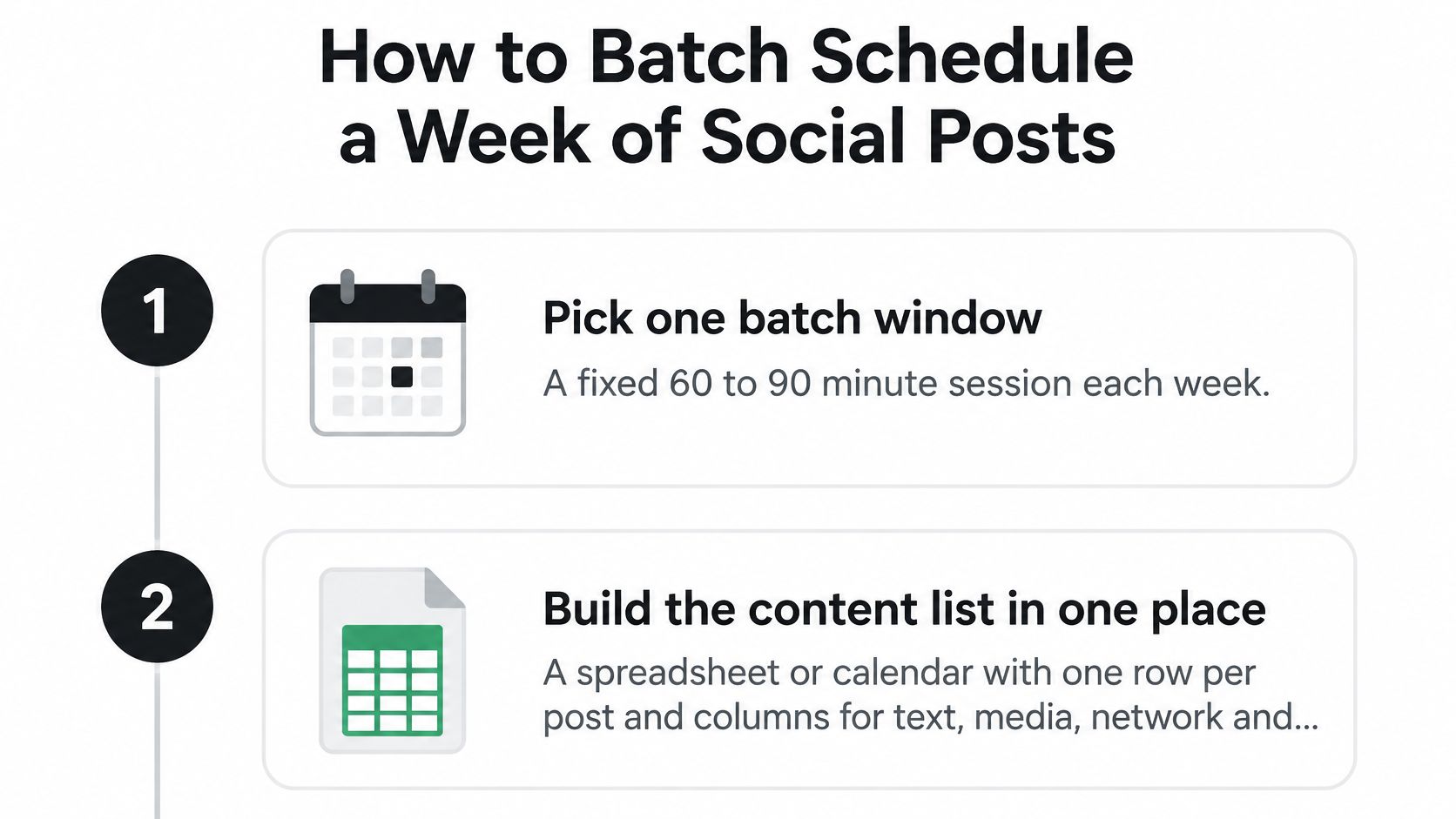
A week of posts fits inside a 60 to 90 minute session if the session has a fixed shape. Skipping steps is what turns a quiet Sunday into a Wednesday fire. Here's the shape that holds.
The weekly session, in order
- Pick one window and protect it. Same hour every week, 60 to 90 minutes. A recurring slot removes the daily decision about whether to post, and the batch becomes a habit rather than a project.
- Build the list in one place. A spreadsheet or calendar with one row per post and columns for text, media, network and publish time. One row per network variant, not one row per idea, so nothing gets pasted blindly into the wrong channel.
- Adapt each draft per network. Length, hashtag count, tone and link placement all change between X, LinkedIn and Instagram. Write the versions side by side while the idea is fresh, because rewriting three days later costs more than doing it now.
- Set a time for each row and mark it as waiting for approval. Nothing should be live by default. A row without a time and a reviewer isn't scheduled, it's a note.
- Check spacing against the caps. Avoid stacking four posts on one network inside an hour, and spread the week across different times of day. Smoothing demand works elsewhere too: a study of batch scheduling in a histopathology laboratory found that shifting part of the morning workload to the afternoon cut workload peaks by more than 50% while still meeting all tardiness requirements, per research on batch scheduling.
- Review the whole batch in one view. Run the approval checklist across all rows at once, not post by post. Batch review is faster and catches cross-post duplication, like the same link going out twice in a day.
- Release, then check the first posts within an hour. A wrong time zone or a broken image is cheap to fix in the first 60 minutes and expensive after a full day of misfires.
- Log every miss and carry it forward. One line per failure: what broke, which network, what the fix was. The log is what makes next week's session shorter.
Pinterest batches need their own step, since boards and pin spacing behave differently from feed posts. If you'd rather automate that leg, an automated pin scheduling tool can queue pins while the rest of the batch runs through your main scheduler.
Where a queue supports it, each automation can publish immediately, schedule into the next peak slot, or place the draft on the calendar for an editor to approve. Those three outcomes cover almost every row you'll write.
Preventing Missed and Duplicate Posts
Scheduled jobs fail in exactly two directions. A post never goes out, or a retry sends it twice. The second failure is the one that embarrasses, because the audience sees it and the audit trail doesn't explain it.
Instagram shows why timing rules exist. Publishing is a two-step flow: the application creates a media container, then publishes it. Per this summary of social media API limits, the publish call has no future-time field, and an unpublished media container expires after 24 hours. So a scheduler can't build every container weeks ahead. It has to keep the approved media and caption stored with the post and create the container close enough to publication.
Five controls that stop a second copy
- Store the approved media and caption with the scheduled post, not in a separate draft folder that can drift.
- Give each post a unique key, built from network, post ID and scheduled time. That key is the identity of the release, not the identity of the idea.
- Check for a success record before publishing. If the key already shows a completed publish, the worker stops and logs a skip instead of calling the API.
- Retry only temporary errors. Rate limits and outages get increasing waits and a fixed attempt cap. Invalid content, missing media and permission errors don't get retried at all, because repeating them just burns quota.
- Mark every post succeeded or failed and route failures to a review list someone opens each morning.
The test is simple: a retry is safe only if running the same post twice leaves the same result as running it once.
Schedulers don't guarantee single execution, so the design has to absorb that. Kubernetes documents that a CronJob "can occasionally create two Jobs or no Job for a scheduled time," and that it skips a missed occurrence after its deadline, per the Kubernetes CronJob documentation. The same honesty applies to social queues.
A concrete version: a post set for 9:00 fails during an outage. The retry at 9:05 succeeds and writes the completion record. At 9:10 the scheduler fires again, sees the record for that key, and skips. Without the key, your audience gets the caption twice. A morning check that compares the queue against published posts catches the other direction, the post that never left.
Keeping Approval in the Batch Workflow
Approval is what makes a large batch safe to release at all. Without it, you're running a live queue that fires whatever the draft happened to say at 11 p.m. on a Sunday.
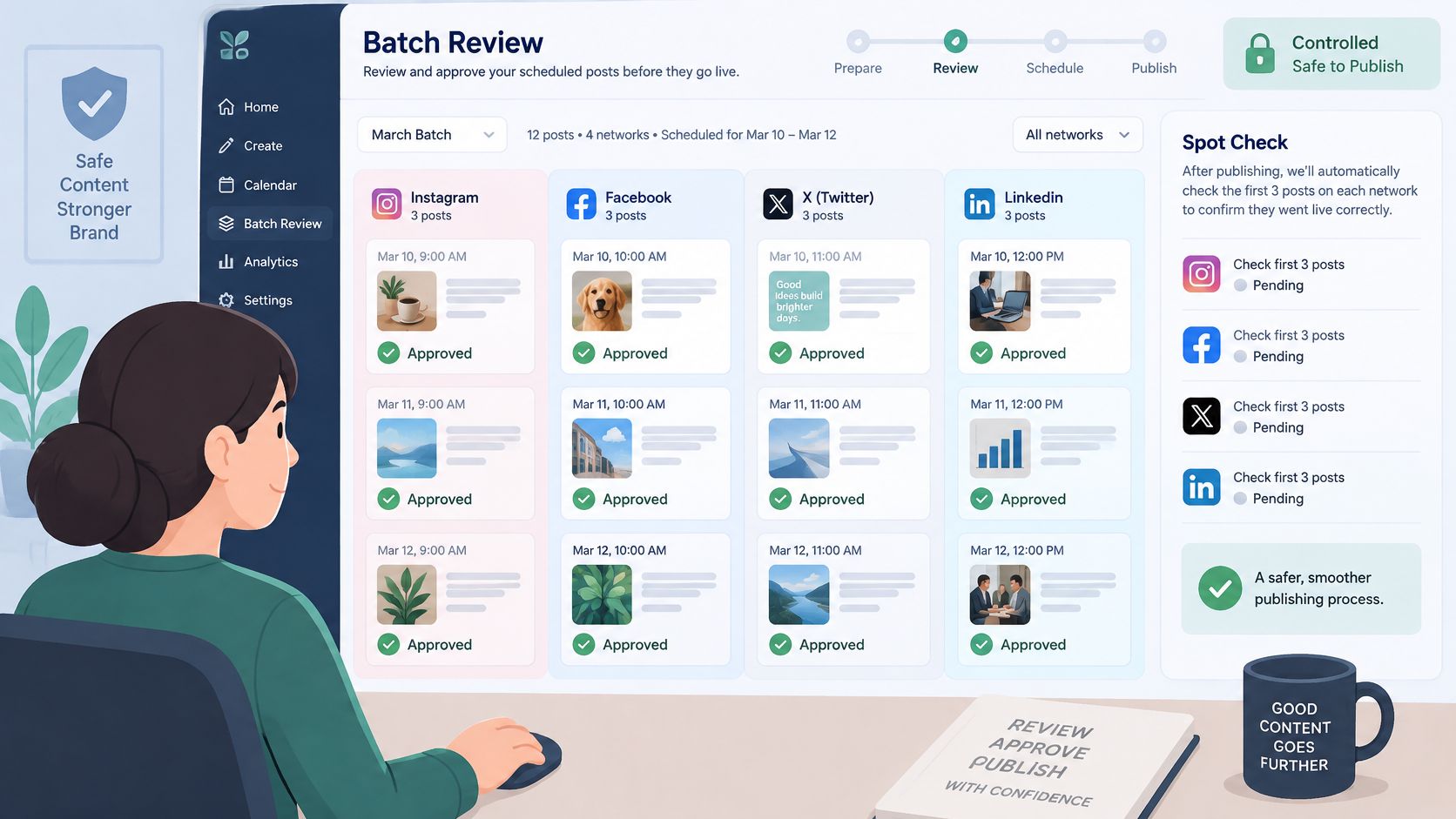
The review screen has one job: show the exact text, the network, the publish time, the media, the links and the connected account, side by side. A reviewer shouldn't have to open six tabs to answer "what will this look like, and where."
What the reviewer checks
- Hashtags match the network. A 30-tag Instagram caption pasted onto LinkedIn reads as spam.
- Links resolve to current pages. A campaign URL that expired last month still looks fine in a preview.
- Times carry an explicit zone. Most batches break on this point.
- No dates have passed. A caption referencing "this Friday's launch" is wrong by Thursday.
- Media fits the format. Vertical video on a feed built for horizontal gets cropped, not fixed.
The time zone trap deserves its own example. A post set for 9:00 UTC publishes at 4:00 a.m. Eastern Standard Time. Many teams don't find out until the post is live and the engagement graph is flat. Daylight saving shifts the result again: the same 9:00 UTC lands at 5:00 a.m. Eastern Daylight Time. Check the offset for the season the post runs in, not the season you set it.
Your platform's approval step should stop every schedule or publish action and show exactly what will post, where, and when, as FoPost's content approval workflow does. That single change turns a live queue into a draft queue: only posts that were scheduled or placed in a recycling queue publish automatically, and nothing publishes without an explicit action from someone.
Rule of thumb: keep approval switched on for your first two batches, then decide with evidence whether to keep it for every one.
Teams handing more drafting to models should read how marketing teams apply AI before they hand over the release button too. Drafting and releasing are different permissions.
Batching Posts With an AI Agent
Say a creator asks an agent for four weeks of posts from a single brief. The agent drafts 28 posts across the networks on the account. The creator approves 7, edits two, deletes three, and leaves the rest waiting. Nothing publishes until someone releases it, and the drafts that weren't approved stay drafts.
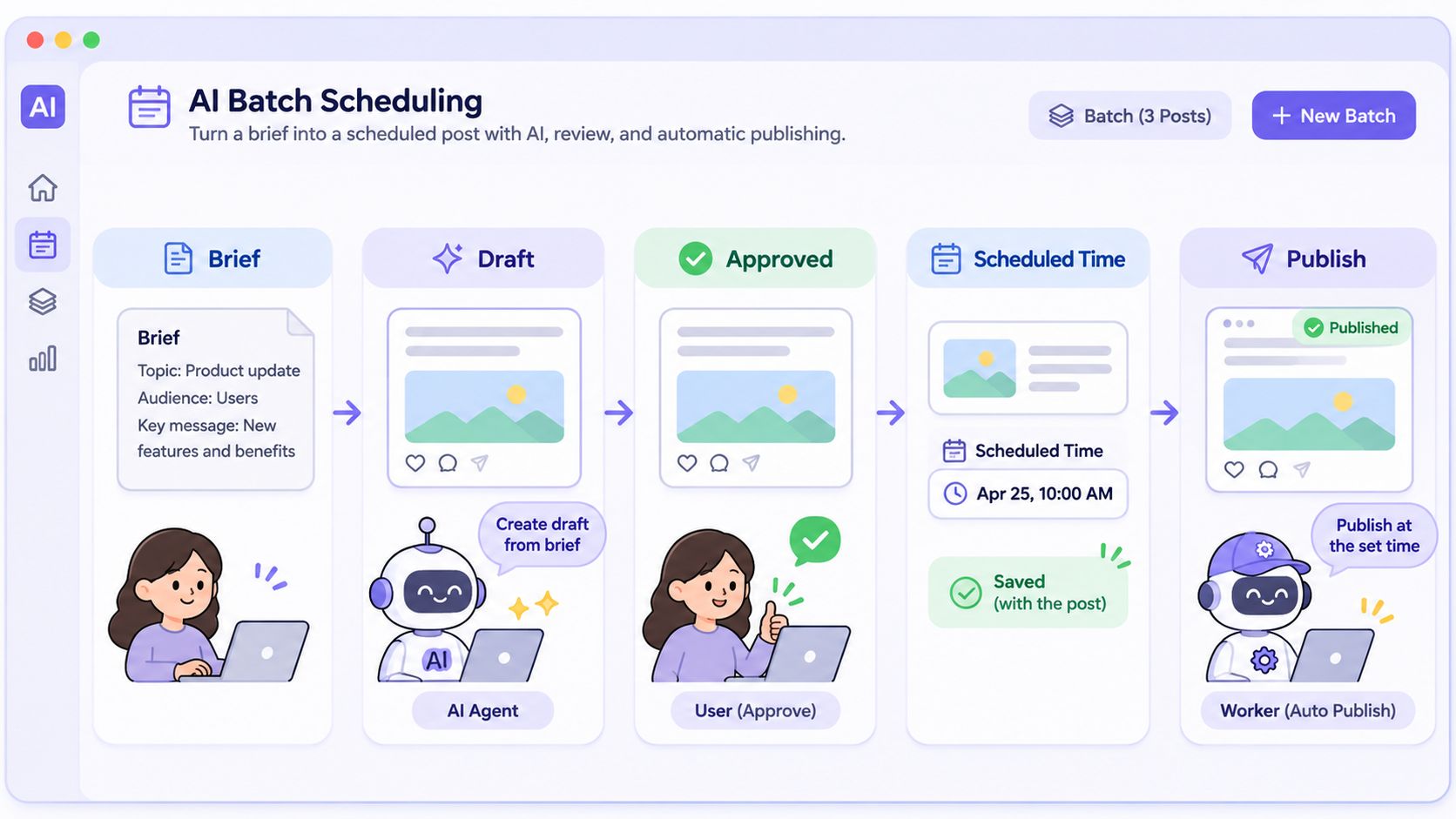
That sequence works because a scheduling tool keeps each approved post and its publish time stored until that time arrives. The schedule lives with the post, not in the agent's memory, so a dropped session or a restarted machine loses nothing. The intended publication time travels with the draft through every retry, and the queue can be inspected at any point before release.
Why an agent should never sleep until post time
Asking a model to hold the thread open until 3 p.m. is the fragile version. If the session drops, the draft is gone and no one knows it was supposed to publish. Persisted state fixes that: draft, approve, store the schedule and timestamp, publish at execution time, record success or failure.
Agents should stay on the proposing side of that line. Scheduling and publishing are approval steps, and an agent can only propose them while the user releases them. Every schedule or publish action stops at an approval step that shows exactly what will post, where, and when. That boundary is what makes an agent useful rather than a liability.
The safest setup also keeps the agent inside its lane. Through FoPost's MCP server, Claude, ChatGPT and Cursor can draft, schedule and manage posts, while every release still waits for an explicit approval on one calendar. FoPost can also watch your feed or CMS, draft a version for each network, then either schedule it around your peak times or hold it for an editor.
Two rules to give the agent in writing: state the time zone for every schedule, and flag any post that conflicts with a platform limit instead of dropping it. Start the first run at 5 to 7 posts and approve each one before it's scheduled.
Running Batches Through an API or Automation Tool
A scheduling API turns a batch into a queue of stored jobs. Each approved post becomes a record with a status field and a schedule_at value. A worker polls for posts whose time has arrived, publishes them, and writes back succeeded or failed. No process holds the schedule in memory, so a deploy or a crash costs you a retry, never a lost post.
Two details decide whether that queue stays clean. Reuse the deterministic key from the duplicate controls, something like (workflow_id, scheduled_time), so a retried submission can't create a second job. Make the completion write atomic, so two workers racing the same poll can't both claim one post.
Four controls to check in any scheduling API
- Time windows with an inclusive start and an exclusive end, so a post sitting exactly on the boundary isn't counted twice.
- Pagination with limit and offset, so a worker can sweep a large queue in pages instead of timing out.
- Ordering by scheduled date, so the next job is always the earliest one.
- Cancellation by account, so an operator can pull one client's pending posts without scanning every account.
Those details are not cosmetic. A documented scheduled-post API lists jobs by profile, filters with ISO-8601 time bounds, paginates, and orders by scheduled date, with the from boundary inclusive and the to boundary exclusive as described in the Upload-Post scheduling API documentation. Get the boundary wrong and you either double-count or drop the post at midnight.
FoPost's scheduling API follows the stored-job model, exposing REST endpoints, SDKs and webhooks so the worker can be your own code, while RSS automations cover the cases where a feed drives the queue. Approval still sits in front: every schedule or publish action stops at an approval step that shows what will post, where, and when before anything releases.
The same job pattern holds when the batch produces other asynchronous output. If your pipeline also renders video, choosing to integrate AI video via API means treating each render as a job with a status and a completion record that a worker polls, the same discipline the post queue runs on.
Schedule Your First Batch This Week
Start smaller than feels impressive. One week, five posts, one spreadsheet row each, with columns for text, media, network and publish time. Adapt each row per network, set every row to wait for approval, run the checklist, then release. A small first batch is deliberate: with only five jobs in the queue, every failure mode is easy to spot and cheap to fix.
Bulk imports scale that up once the shape works. A CSV upload can schedule dozens of posts at once, such as a month of captions from one spreadsheet, and the calendar opens in week view so rescheduling means dragging a post to a different day or time without opening it.
Check the first posts within an hour of release. Review analytics after 48 hours and decide which posts deserve a repeat, then feed those into next week's session. If an agent does the drafting, keep the first run at 5 to 7 posts and approve each one.
FoPost bills by connected social accounts rather than team seats, with two free accounts, a recurring monthly usage credit, and graduated per-account rates. Current plan details are on the pricing page.
Build the five-post list before the end of this week. Schedule it with approval switched on, and the batch runs without you watching it.
FoPost connects your AI agent (Claude, ChatGPT, Cursor or any MCP client) to the networks you publish on, and every schedule or publish action stops at an approval step that shows what will post, where, and when. You can plan a week in one sitting, review the whole batch in one calendar, and let the queue handle delivery within each network's limits. Start with the two free accounts at FoPost and run your first batch with approval switched on.