More than half of surveyed U.S. consumers expect a brand response within an hour, yet fewer than two in five consider the social service they receive excellent, according to Emplifi's consumer expectations report. Connecting social media and customer relationship management means giving every conversation an owner, a deadline, and a recorded outcome. A publishing calendar alone can't do that.
Table of Contents
- What Social Media CRM Covers and Why It Matters
- Response Time Targets Customers Expect
- Platform Limits That Shape Your Schedule
- When AI Replies Should Hand Off to a Person
- Handling Public Complaints Before Moving to Private Messages
- Route Messages Into One Workflow and Set It Up This Week
What Social Media CRM Covers and Why It Matters
The service gap predates AI agents. In a survey of more than 1,000 U.S. consumers, the 2015 State of Customer Experience report found that 42% expected a response and resolution within an hour, while one-third said they never received any response.
Consider a small clothing brand. A customer comments on Instagram about a missing package, sends a direct message, then mentions the brand on X. The founder answers the comment. An agency handles the mention. Nobody checks whether the package arrived.
The team has activity, but no accountable case.
A conversation needs a record, not just a notification
Social media CRM captures customer comments, mentions, and direct messages, links them to customer or case history, and tracks response, resolution, and follow-up. Traditional CRM usually starts with an internal contact or transaction. Social CRM must also handle conversations that begin publicly, before the team knows who the customer is.
The components connect like this:
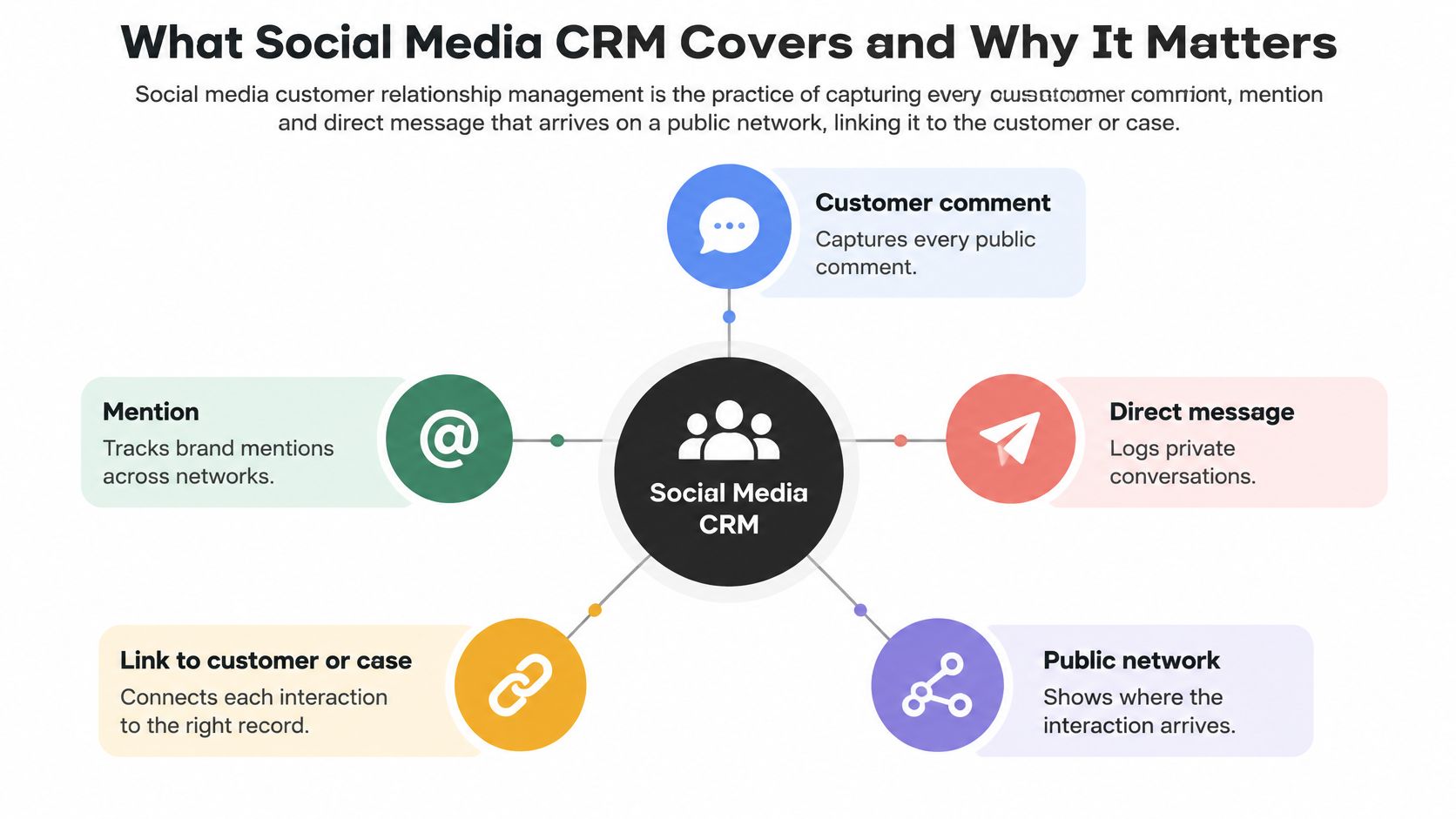
A practical system needs connected functions:
- Publishing provides the context behind incoming questions, including the promotion or product that prompted them.
- Monitoring identifies relevant comments and mentions.
- A shared inbox makes conversations visible to the people responsible.
- Routing rules establish ownership and escalation.
- Analytics show whether customers received useful answers and reached a resolution.
The missing-package case should retain its original post, private conversation, assigned owner, promised action, and delivery outcome. A reply isn't the same as a resolution, and marking a message read shouldn't close the case.
Keep social connected to the wider customer history
An agency needs brand separation. A solo founder needs a reliable queue rather than another dashboard to check. Both need enough context to avoid asking customers to explain the problem again.
Identity matching deserves care. Similar usernames aren't proof that accounts belong to the same person. Keep uncertain matches separate until the customer confirms the connection through an appropriate private process.
Starting exercise: list every account that receives customer messages and write down who answers each one today. Any account without a named owner represents an operational gap, even if its publishing schedule looks healthy.
Response Time Targets Customers Expect
Expected reply times and what they mean for the inbox
The following expectations come from a survey of more than 1,000 social media users aged 16 to 55 summarized by MarketingCharts. The operational responses are recommended inbox settings, not survey findings.
| Expected reply time | Share of social users | What it means for the inbox |
|---|---|---|
| Within 5 minutes | 10% expect it | Live notifications for new messages |
| Within 30 minutes | 22% expect it | Priority queues for direct messages |
| Within 1 hour | 20% expect it; 52% in total expect a reply within the hour | A default first-response target |
| Within 24 hours or longer | 9% accept longer than 24 hours; 19% say brands typically take longer than 24 hours | A visible gap between acceptable service and experience |
The final row concerns waits longer than a day, not acceptance of every response delivered during that day. That distinction matters when turning expectations into a service-level agreement.
A customer expecting an almost immediate reply needs a monitored notification, not an unread badge. For a small team, that means an on-duty owner and a backup, with alerts limited to messages that require intervention.
A priority queue suits less urgent direct messages. Separate service requests from reactions, spam, and general mentions so the owner doesn't have to inspect everything chronologically.
Set targets that match staffed coverage
The 2026 Metrigy customer-service report found that slightly more than half of consumers consider a response of up to five minutes acceptable on social media. A separate global survey summarized in that document reported that 38% of people contacting a brand about a care issue expected a response within one to two hours, including 14% who wanted a reply within minutes.
Those populations and questions aren't interchangeable. They support a practical conclusion, not a universal deadline: urgent social conversations need active coverage.
Service-level rule: measure the first useful response separately from acknowledgment and final resolution.
A proposed starting standard is a one-hour first response for direct messages on busy accounts during staffed hours. Outside those hours, an availability notice should state when a person will respond. An automated greeting shouldn't count as useful service.
SignalZen's guidance on improving chat and email support is useful when extending the same ownership model beyond social. Consistent handoffs matter more than identical wording across channels.
Measure the queue, not just the average
Track the oldest unanswered conversation alongside typical response time. A healthy average can hide neglected complaints, which also makes response coverage part of social media reputation management.
Set a first-response target for each network and message type. Review misses weekly, separating staffing gaps, approval delays, and failed deliveries.
Platform Limits That Shape Your Schedule
Publishing limits by network and what they change in the schedule
Each network caps how often an account or application can publish, and those caps set the outer boundary of every content calendar. The table below summarizes the kinds of limits teams run into on major networks. Platforms revise quotas, access tiers, and pricing on their own schedules, so confirm current figures in each network's official developer documentation before designing a schedule around them.
| Network and limit | How it works | Reset pattern | Practical effect |
|---|---|---|---|
| YouTube Data API quota | Shared unit budget consumed by API calls | Daily | Budget calls across scheduled jobs |
| YouTube video uploads | Daily cap on upload calls | Daily | Cap large video batches to the daily count |
| X posts per user | Per-user rate limit | Short rolling window | Spread posts across each window |
| X posts per application | Shared ceiling across all accounts on the app | Daily | Track usage across connected accounts |
| X post pricing | Per-post charge that can differ for posts containing links | Per API activity | Budget bulk link-heavy posting separately |
| TikTok upload starts | Small per-minute allowance | Per minute per creator | Queue uploads instead of sending bursts |
| TikTok typical volume | Modest daily posting volume | Per day per creator | Plan volume per account |
| LinkedIn counters | Separate application and member limits | Daily reset | Track both counters independently |
Two details catch teams off guard. Application-level counters are shared across every account connected through the same app, so one busy brand can consume capacity another expected to use. And typical posting volume is not a guaranteed allowance. A network can tighten enforcement without notice, which is why the schedule should degrade gracefully instead of failing without response.
Separate scheduling intent from delivery state
A calendar entry records when a team wants something published. A successful platform response records whether it happened.
That difference matters for customer relationships. A scheduled product announcement may create support demand, while a delayed correction can leave customers acting on outdated information. The support team needs to know what went live, not what was supposed to.
A scheduler should preserve distinct states such as approved, queued, attempted, published, deferred, and failed. Keeping only scheduled and done hides the failures that require human attention. A post stuck in deferred for three hours is a customer-facing problem, and nobody sees it if the queue reports success.
Different reset windows also make a universal daily cutoff unreliable. Store quota state by network and account where appropriate, with timezone-aware timestamps.
Retry without losing approval or creating duplicates
A sound delivery queue should:
- Reserve capacity for approved jobs and account for shared application usage.
- Defer throttled work until the platform permits another attempt.
- Preserve the approved draft rather than regenerate different copy during retry.
- Check uncertain outcomes before resubmitting a request that may already have succeeded.
- Notify an owner when the intended publication time can no longer be met.
The duplicate check deserves emphasis. A timeout tells you the request failed to return, not that the post failed to publish. Resubmitting blindly can put the same announcement out twice, and customers notice.
Unlimited scheduling inside a tool doesn't mean unlimited permission to publish through a network.
For AI agents, the boundary should be explicit. Planning a batch doesn't authorize publishing it, and approving a batch doesn't remove platform constraints. Keep approval evidence attached to the exact network-specific draft through every delivery attempt.
When AI Replies Should Hand Off to a Person
Satisfaction with AI doesn't imply a preference for it. Emplifi's 2025 consumer research found that 71% reported satisfaction with AI support experiences, but only 25% preferred AI-powered service and 56% preferred human support; it also found that 47% would wait longer for a more human, empathetic response, while 60% worried AI-generated replies could be inaccurate.
The operational lesson isn't to remove AI. It's to limit what AI can decide.
AI suits bounded work: drafting an answer from an approved policy, summarizing a thread, suggesting a relevant help article, or preparing scheduling options. It shouldn't infer permission to issue money, disclose account information, or make an exception because the customer sounds persuasive.
Escalate according to risk and uncertainty
Write handoff rules around concrete conditions:
- Emotional intensity: repeated frustration, distress, or a customer explicitly requesting a person.
- Financial risk: disputed charges, compensation, refunds, or conflicting payment records.
- Privacy sensitivity: identity documents, credentials, health details, or account recovery.
- Ambiguity: missing facts, contradictory policies, or an answer that requires guessing.
- Customer history: earlier failed attempts, unresolved commitments, or a reopened complaint.
For example, a routine order-status request can receive an AI draft for approval, provided verified order information is available. A duplicate-charge complaint should go directly to a person who can inspect billing records. Refunds, safety issues, legal claims, and account access should always require human approval.
Make the handoff useful
A transfer should include the original conversation, a concise summary, facts already verified, actions attempted, and the unresolved question. Otherwise, automation saves staff drafting time by making the customer repeat work.
For appointment workflows, Expressify AI chat that books appointments provides a concrete example of a bounded automation use case. The same boundary applies on social: arranging an available appointment is different from deciding whether a sensitive situation can wait.
A documented AI reply-draft review process helps separate suggestion from authorization. Reviewers should check the proposed action and supporting facts, not merely tone and grammar.
Resolution quality, repeat-contact rate, escalation accuracy, and customer trust should determine whether automation works. Faster drafts aren't a success if customers return with the same unresolved problem.
Handling Public Complaints Before Moving to Private Messages
Moving every complaint into direct messages can make a public feed look tidy while leaving the original concern visibly unanswered. Private problem-solving doesn't replace public acknowledgment.
Sprout Social's customer-care guidance reports that 51% of consumers contacting a brand publicly expect public acknowledgment before moving to a private message, while roughly three-quarters expect a response within 24 hours or sooner; separate 2025 research cited there found that 73% of social users would buy from a competitor if a brand failed to respond on social.
The public and private stages serve different purposes:
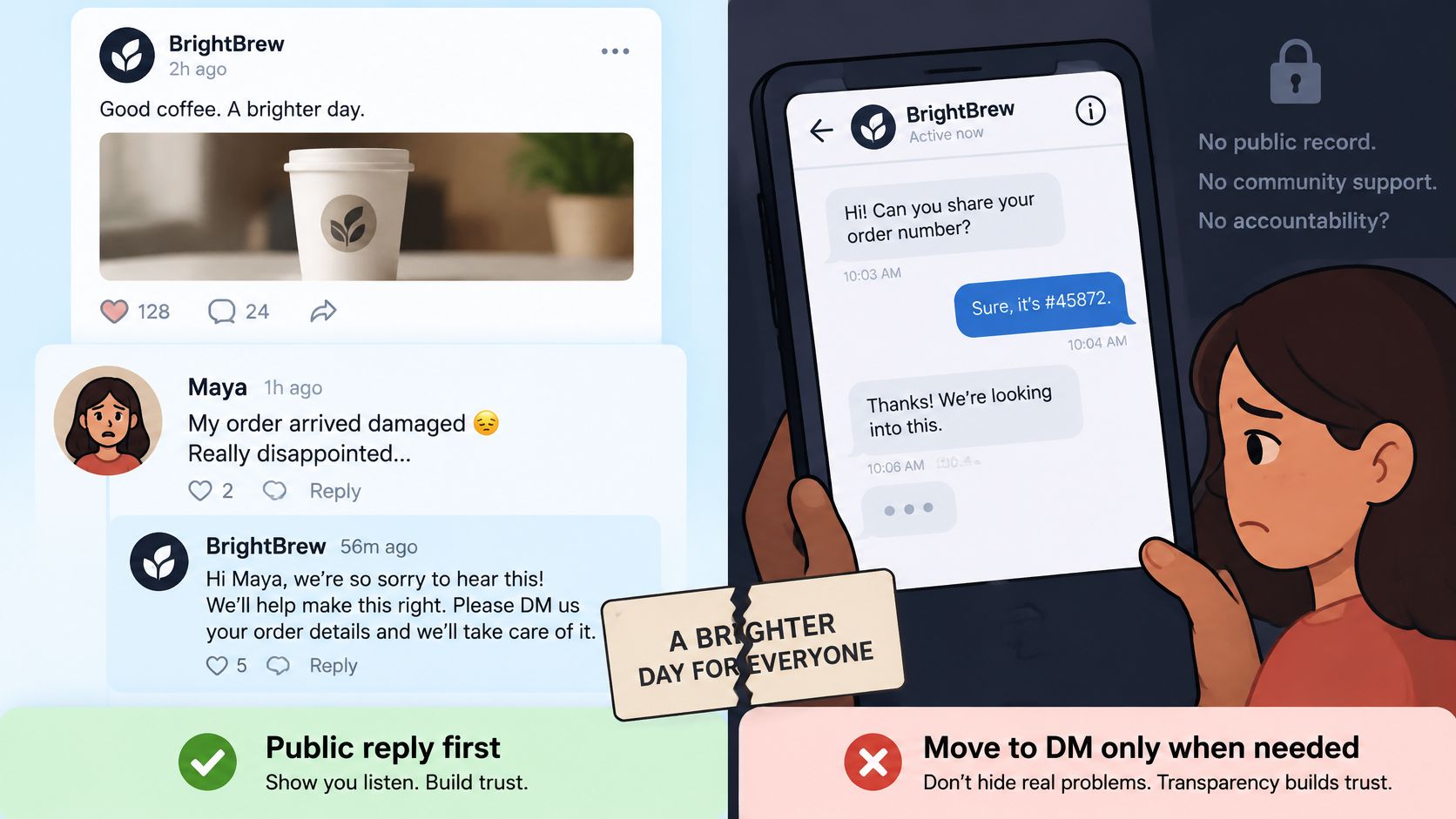
Acknowledge publicly, authenticate privately
Consider a customer posting about a delayed delivery under a product announcement. A suitable public response acknowledges the delay, apologizes, and explains that the team will follow up privately. It shouldn't promise a replacement before anyone checks the order.
The private message can direct the customer to a secure form for the order number and necessary verification. The public thread should never request payment details, identity documents, or account credentials.
A practical sequence keeps the purposes separate:
- Public acknowledgment: confirm that the team has seen the complaint and state the next action.
- Private authentication and resolution: verify identity, inspect records, and agree on a remedy.
- Public closure when appropriate: confirm that the team followed up without exposing the outcome's sensitive details.
If the customer hasn't responded privately, the case remains waiting, not resolved. If the customer disputes the proposed remedy, a public closure note mustn't imply agreement.
The following video provides an additional discussion point for a team reviewing its customer-service approach:
Account for what remains visible
Public replies can persist in screenshots and reposts after deletion. Staff should avoid speculation, blame, or promises they lack authority to honor.
Language and local business hours affect routing. Platform differences matter too: a customer may not be able to receive a private message until a platform-specific condition is met. Provide an approved secure alternative instead of repeatedly asking the customer to check an inaccessible inbox.
Privacy boundary: any message containing personal or payment details should enter the private-handling stage immediately.
If sensitive information is already public, follow the platform's moderation options and the company's incident procedure. Don't reproduce it in internal summaries unnecessarily, and don't quote it in a public reply.
Route Messages Into One Workflow and Set It Up This Week
A longitudinal study of 232 companies published in the Journal of Interactive Marketing found that social-media activity strengthened the positive relationship between social CRM capability and firm performance. Running accounts actively mattered less than the ability to capture, interpret, and act on the interactions they generated.
That capability is organizational. The workflow behind it connects every incoming event to a recorded decision and a measurable outcome, and ownership has to be settled before automation enters the picture.
The process can be mapped as follows:
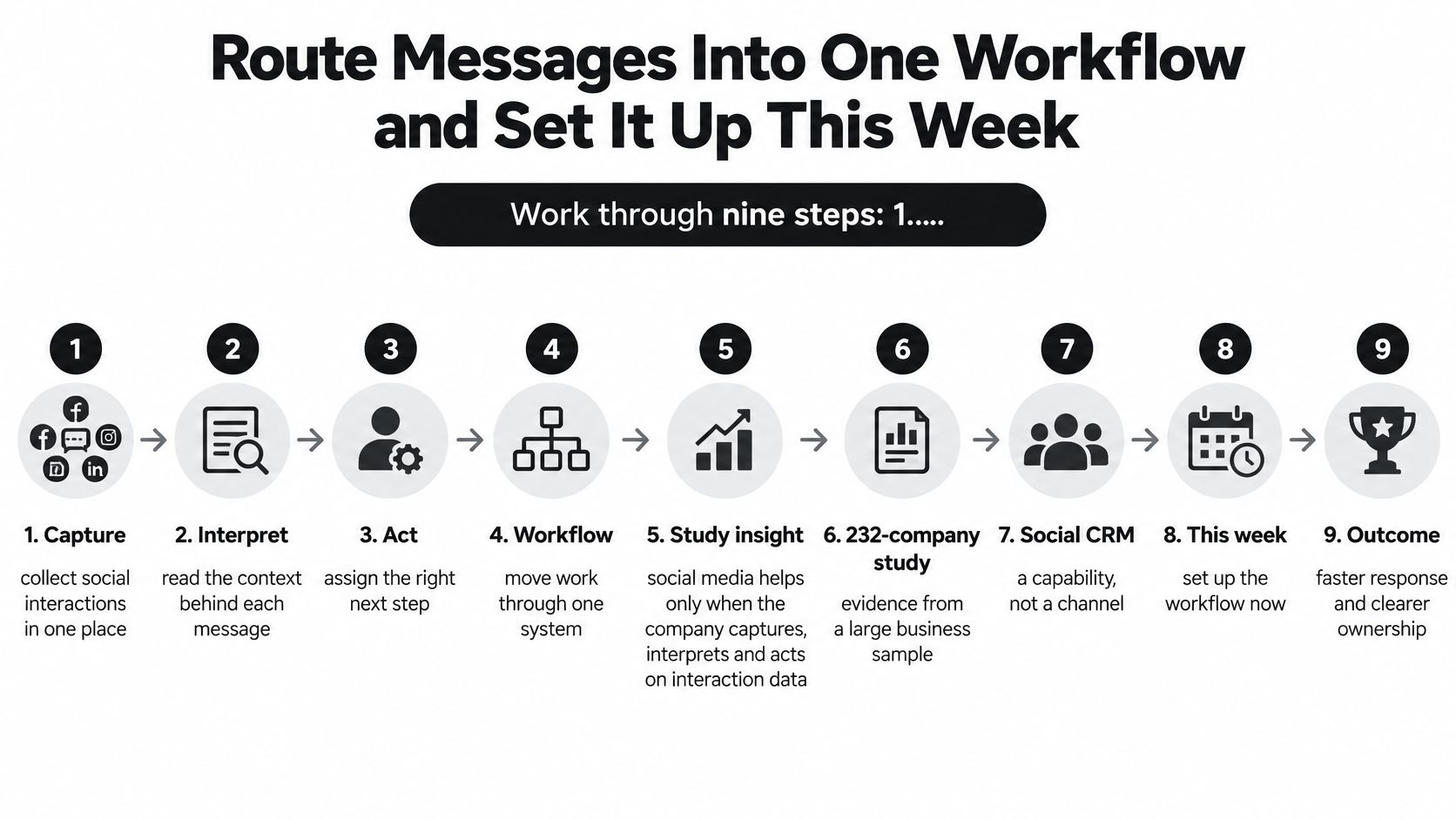
Build the operating workflow
Connect every account that receives customer messages.
Inventory accounts by brand, network, owner, and backup. Include accounts that publish infrequently but still receive questions. Remove abandoned destinations from public contact instructions so customers never discover, mid-complaint, that nobody monitors the channel.Confirm account type and permissions before scheduling.
The PostWharf publishing API guide explains that Instagram requires a professional account and approved API access, TikTok restricts unaudited applications to private posts, and Facebook Page scheduling requires a Page token and a role permitting content creation. Test authorization before preparing a large batch. A connected account is no proof that every intended action is permitted.Pull supported comments, mentions, and direct messages into a shared queue.
Check coverage separately for each interaction type. Publishing support does not establish full message access on its own. Test ingestion with a real comment and a direct message, then document the gaps that still require native-platform checks.Create a customer or case record and merge confirmed duplicate threads.
Retain the original platform identifiers and message links. Developers should use stable external IDs to prevent repeated webhook deliveries from creating duplicate cases. Keep an audit trail when merging records so a mistaken identity match can be reversed.Route each item by brand, channel, and intent.
Assign a named owner and backup. Agency routing should prevent one client's conversation from entering another client's workflow. Sales questions can go to a commercial owner; unresolved service issues should not disappear into a lead-generation queue.Draft with brand voice and conversation history attached.
Include the applicable policy and verified facts. If information is missing, the draft should ask a focused question rather than invent an explanation. Keep internal notes visibly separate from customer-facing copy.Approve each reply before publication.
The reviewer should see the destination, full context, proposed action, and exact text. Material edits after approval should trigger another review. Confirm that the approved reply was delivered; approval alone does not close the task.Timestamp every state change.
Record assignment, draft creation, approval, publication, escalation, and closure. Retain failure events too. The customer-facing clock should keep running through reassignment and delivery retries instead of restarting whenever the system changes state.Review first-response time and resolution rate by network.
Define resolution as an issue addressed, not an inbox item archived. Track repeat contact and reopened cases alongside speed. Connect retention or revenue outcomes only where records support the association, rather than attributing every later purchase to a social reply.
Connect tools without creating another silo
FoPost's inbox and approval-based reply drafting provide a working surface for the conversation-handling stages; the FoPost inbox overview explains that workspace. Accounts can be connected across its 33 platforms, including X, Facebook, Instagram, LinkedIn, TikTok, YouTube, Threads, and Pinterest. One boundary matters for agencies in particular: the text of comments, messages, and replies inside one customer's connected view is never disclosed to another customer. Customer-record matching, routing logic, and service reporting should still be validated against the actual implementation instead of being assumed from publishing coverage.
When a CRM or help desk sits elsewhere, AY Automate's comparison of workflow automation platforms can help frame the connector choice. Pick an integration that preserves IDs, ownership, and failure status over one that copies message text alone.
A useful acceptance test is deliberately inconvenient: send a duplicate event, revoke a permission, and trigger a failed delivery. Each one should produce a recoverable state and a visible owner.
Launch a small operating pilot
Start with a single brand and its busiest pair of networks. As a proposed pilot standard, set a one-hour first-response target for direct messages during staffed coverage, with a faster target for urgent comments on the busiest network.
Write explicit human-routing rules for refunds, safety reports, and account access. Assign an approval backup before enabling AI drafts. Connect service measurements through the CRM, help desk, or an event log if the existing analytics only measure content performance.
After two weeks, compare handling against the pilot targets. Inspect the conversations that missed them and fix the most common failure point: routing, staffing, approval coverage, or delivery recovery. Relationship outcomes like repeat contact and reopened cases show whether the loop is closed; reach metrics alone cannot.
FoPost combines a social inbox, approval-based reply drafts, and a publishing calendar so incoming conversations can be handled alongside outgoing content, and its REST API, webhooks, and MCP server are included on every account for teams routing events through a CRM or help desk. Click Start Free, connect an account, and publish a first post, then assign an owner to the responses it generates.