Write once, publish everywhere, done in ten minutes. That's the promise, and the timing is about the only part of it that holds up. The publish button is not one action. Each network receives its own request, measures it against its own character limit, its own media spec and its own daily cap, and can fail on its own terms while the others succeed.
The reach argument for posting to all social media at once is sound. At the start of 2025 the world held roughly 5.24 billion active social media user identities, 63.9% of the global population, after adding 206 million in twelve months, and the average internet user was active on 6.83 different platforms each month, according to DataReportal's Digital 2025 global overview. One network can't cover that audience.
What breaks is the middle. The adaptation each network needs, the quotas nobody reads until a schedule stalls, the retries that publish twice, and the disclosure rules that arrived after most cross-posting guides were written. The workflow below handles all four.
Table of Contents
- Which Networks Take the Same Post and Which Don't
- Choose How to Publish to Several Networks
- How to Build One Source Post Before Adapting It
- How to Adapt Each Network Version Without Starting Over
- AI Disclosure and Approval Before Release
- Schedule Within TikTok and YouTube Limits
- Retry Failed Posts Without Creating Duplicates
- Run a 20-Post Pilot Before You Scale
Which Networks Take the Same Post and Which Don't
Identical text posted to every network rarely performs anywhere. The limits are the first reason.
| Network | Text limit | Media format | Change needed |
|---|---|---|---|
| X (standard account) | 280 characters | Image at 16:9 or 1:1 | Cut to one idea and one link |
| Threads | 500 characters | Image or video, 4:5 or 1:1 | Shorten, or split the idea into a thread |
| Bluesky | 300 characters | Image, 1:1 or 4:5 | Cut to a single sentence and attach the image |
| Mastodon | 500 characters by default | Image or video | Check the server limit, which can differ |
| 3,000 characters | Image at 1.91:1 or 4:5 | Put the hook in the first two lines | |
| 63,206 characters | Image, 1:1 or 4:5 | Keep the lead sentence short and direct | |
| 2,200 characters in caption | Image 4:5 to 1.91:1, Reels 9:16 | Remove clickable links and point to the link in bio | |
| TikTok | 2,200 characters in caption | Vertical 9:16 video | Check the account maximum video length |
| YouTube | 100-character title, 5,000-character description | Video required | Write a separate title and add a thumbnail |
| 100-character title | Tall 2:3 pin image | Re-crop to a tall vertical frame | |
| 300-character title | Text, image or link post | Follow each community's post rules |
Teams aren't choosing between these networks. In a 2024 survey of brand, retailer and agency professionals, 97% said their companies or clients used Instagram, 89% used Facebook, 86% used TikTok and 73% used YouTube, Digiday Research found. One campaign, four formats at minimum.
Where the rework actually comes from
X is the squeeze point. A 280-character ceiling on standard accounts means one idea, one link, no preamble. If the message needs 400 characters to land, it isn't an X post yet, and forcing it produces the truncated, unreadable version everyone scrolls past. Threads at 500 and Bluesky at 300 give more room but still punish copy written for LinkedIn.
Instagram and TikTok break differently. Both allow 2,200 characters in the caption, and neither makes a link clickable, so the destination moves to the bio and the caption has to say so. On TikTok the video is the post, vertical 9:16, and the account's own length limit applies before the file does.
YouTube and Pinterest need a different asset, not a different caption. YouTube requires a video plus a title of up to 100 characters and a description of up to 5,000. Pinterest stops titles at 100 characters and wants a tall 2:3 image.
Reddit is a set of communities, not a network. Titles stop at 300 characters and each subreddit enforces its own posting rules, so the same link is welcome in one and removed in another.
Working rule: write the copy for the longest destination first, then cut down. Cutting is faster and safer than expanding, because expanding means inventing sentences nobody approved.
Limits move. Confirm each figure in the platform's current documentation before a large campaign rather than trusting a table in a blog post, including this one.
Choose How to Publish to Several Networks
A post can reach five networks through five separate logins, one publishing workspace, or a workflow built on platform APIs. The choice changes who handles formatting, approvals, quotas and failed-post recovery.
- Native schedulers. They work for one or two accounts, but each network remains a separate job. A five-network campaign means repeating the scheduling and review steps five times.
- Multi-network tools. A shared calendar and publishing workflow reduce repeated handling, but coverage and features vary by product. FoPost lets teams write once, adapt posts for each network, schedule and publish across 33 platforms, and measure results in one workspace. For a broader look at tools, see these social scheduling app reviews from RedactAI.
- Direct APIs and SDKs. They offer control over publishing workflows, while your team takes responsibility for platform quotas, token refresh, retries and duplicate prevention.
Count publishing actions before choosing. Twenty posts a month across five networks create 100 publish actions. At roughly two minutes per manual action, that is about 200 minutes of repeated scheduling work, before writing or adapting the posts.
Use native schedulers when you manage only a few accounts and can handle each network separately. Choose a multi-network tool when one team needs a shared calendar and approval flow. Build on APIs when publishing must run inside your own product. In every case, platform limits still apply.
How to Build One Source Post Before Adapting It
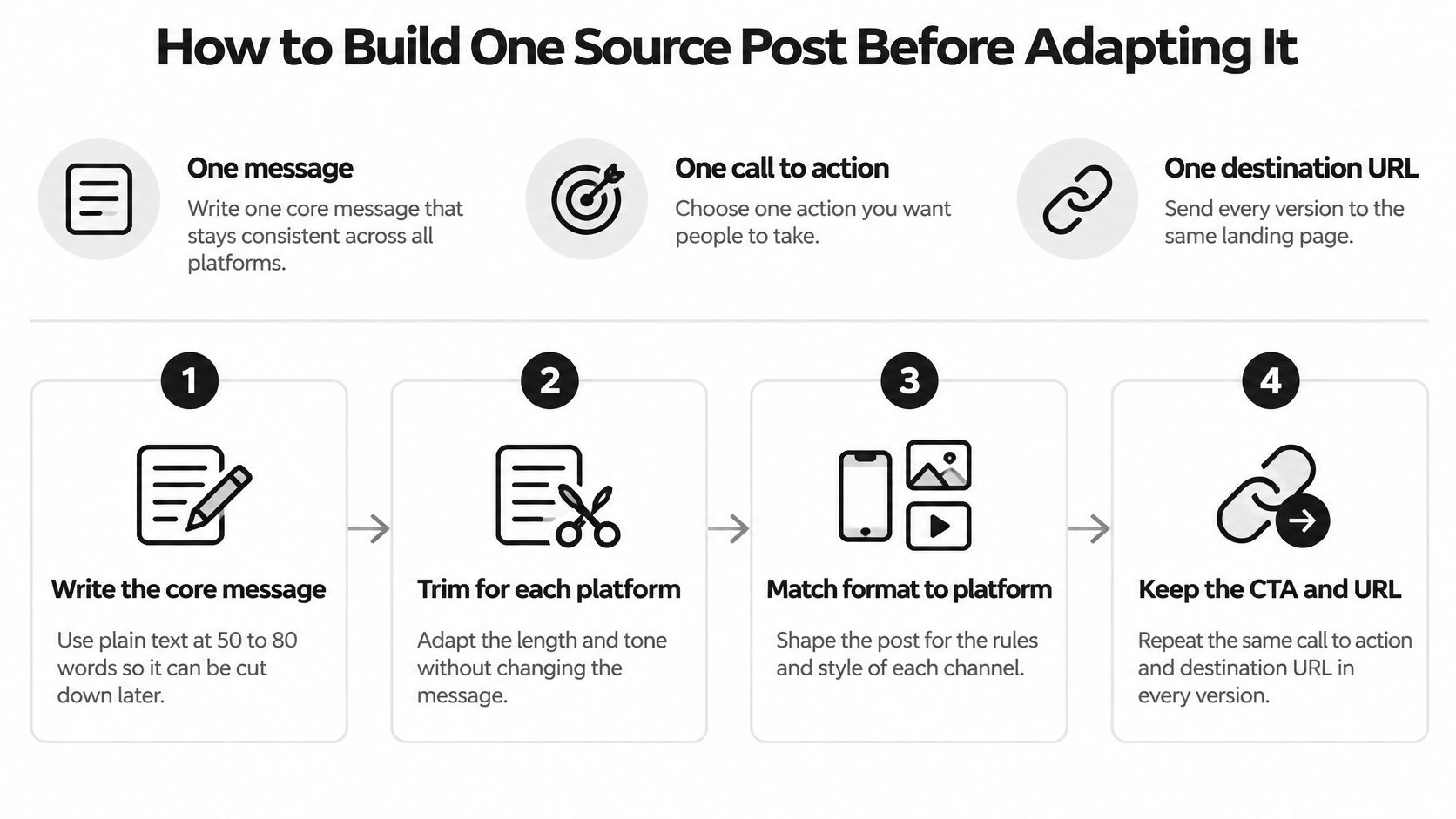
A source post carries three things: one message, one call to action, one destination URL. Everything else in the package is a variant of those three.
Six steps from message to package
- Write the core message at 50 to 80 words in plain text. That length holds a full argument and still cuts to 280 characters without losing the spine of it. The common slip is drafting straight into an Instagram caption, then finding nothing left worth posting on X.
- Set the destination URL and tag it. Name the campaign, the network and the placement in the UTM parameters so each platform reports separately. Linking without tags turns every network into one undifferentiated pile of traffic.
- Export one master at the largest size you need, then crop from it. Cut 4:5, 1:1 and 16:9, plus 9:16 for TikTok and 2:3 for Pinterest. The slip is resizing a small file upward, or cropping tightly enough to cut off the face you're promoting.
- Write alt text and captions with the copy, not after it. The UC Berkeley digital accessibility guidance for social media is specific about why: image descriptions should convey purpose and context rather than repeat what's visible, videos need accurate synchronized captions, and auto-generated captions have to be reviewed by hand because they misrecognize names, acronyms, slang and non-speech audio.
- Confirm rights for every photo, font and clip, and record the confirmation in the package. A stock license that covers one brand doesn't cover a client account.
- Save the package with a version ID. Every later variant traces back to the approved text, which matters when a number changes and three networks need the correction.
What a finished package holds
The full set is short: approved text, destination URL with tags, master media, the crop set, alt text, captions, hashtags, rights status and version ID. The NYC Mayor's Office for People with Disabilities guide to accessible social media treats that bundle as the thing you approve, which is the useful part. You approve once, then validate each variant against the platform's schema and check the accessibility fields before anything goes live.
If the 9:16 slot needs something you can't shoot, an explainer built from the master image is the cheaper answer, and these video animation studios show what that output typically looks like.
The message itself should come from a documented social media content strategy rather than this week's idea, because a package is only as good as the decision behind it.
How to Adapt Each Network Version Without Starting Over
Adaptation is four edits per network, made from the package, not a rewrite of it. Crop to the aspect ratio. Cut the copy to the limit. Trim hashtags to the platform's habit. Move links to where they work.
Take a 240-word intro to a blog post. The X version runs 260 characters, carries one link and drops the second argument entirely, because a second argument doesn't fit and half of it reads as noise. The LinkedIn version is three sentences, stays well under 3,000 characters and ends on a question, since the first two lines decide whether anyone clicks see more. The Instagram caption names the offer, uses 4:5 or 9:16 media, and says the link is in the bio because there's nowhere else to put it.
A version can fit the limit and still lose the voice. Rewrite the first and last line by hand on every variant, and let the middle stay borrowed.
This is the part of posting to all social media at once that costs the hours, and it's where AI earns its place. FoPost takes one post and turns it into the right version for every network you're on, then schedules the whole week from one calendar, so drafts start inside each platform's limit instead of being trimmed after the fact. Treat the output as a draft anyway. Rewrites drift toward generic phrasing and occasionally add a claim that isn't in the source package, so check the first sentence, every number and every link against the approved text before scheduling.
Video is the other adaptation nobody budgets for. Reels and TikTok both want a full-screen 9:16 frame, and these full-screen Instagram Reel dimensions cover the resolution and safe zones so captions don't land under the interface.
Before scheduling, read the rendered post rather than the draft: text length, crop, link placement, handle format, hashtag count and the first line as it appears in the feed. Six checks, thirty seconds per network.
AI Disclosure and Approval Before Release
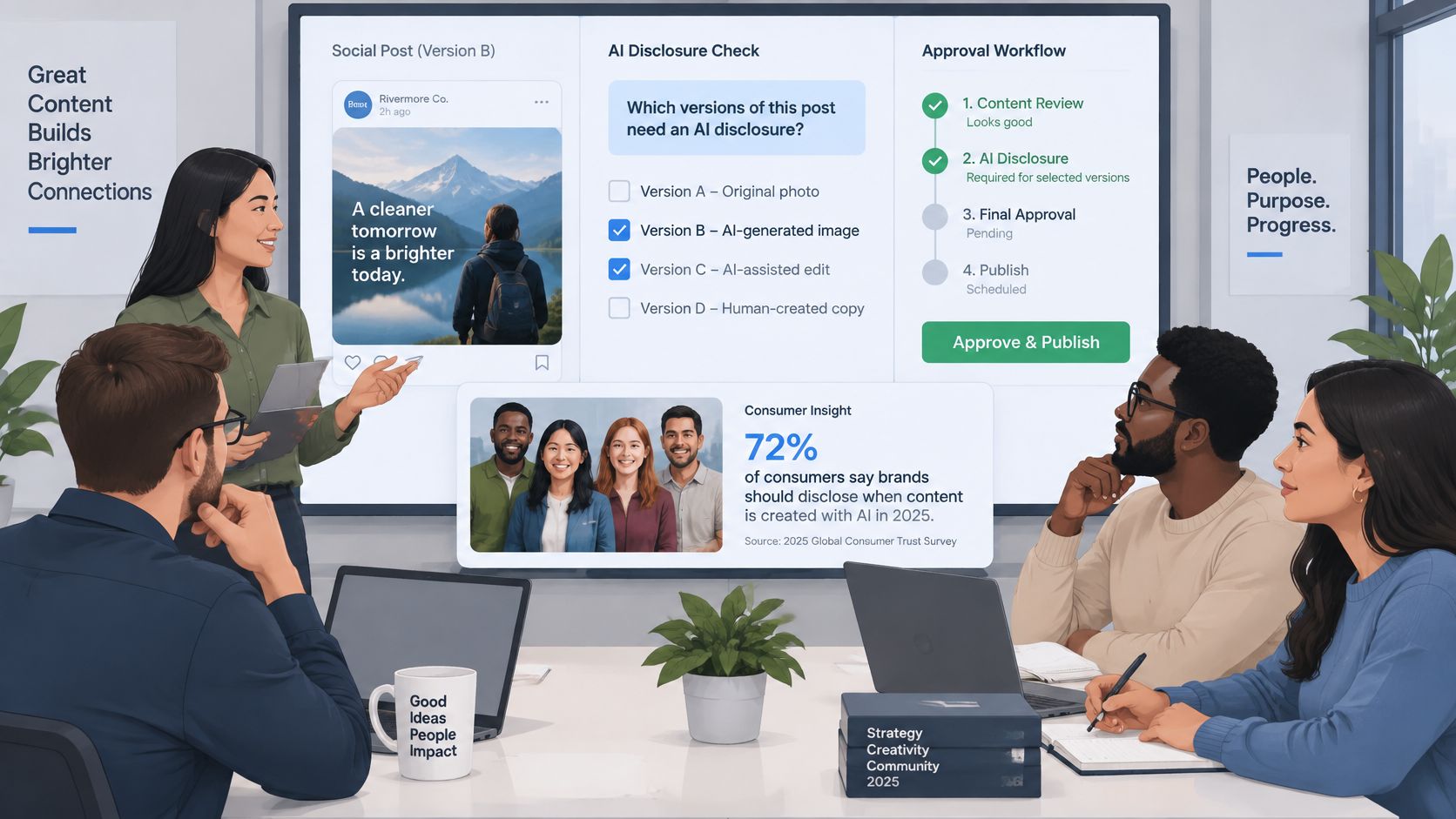
Disclosure is the question most cross-posting workflows skip: which versions need an AI label? The audience has an opinion. In a 2025 survey of more than 2,000 consumers in the United States, the United Kingdom and Australia, 52% said they were concerned about brands publishing AI-generated content without disclosure, and 55% said they were more likely to trust brands committed to human-created content, according to Amplitude Marketing's summary of the Sprout Social pulse survey.
Define what counts as materially AI-assisted
Three things qualify: a generated image, copy published with little or no human edit, and a synthetic voiceover. A grammar fix or a moved comma doesn't. Write the definition down once so a reviewer isn't deciding case by case at five in the afternoon.
Build the record that travels with each variant
Every network version needs a small record attached: source version ID, which elements were AI-assisted, the disclosure text used on that network, the approver's name and the approval time. Disclosure format can differ by channel, an image label on one, a caption line on another, a note in the alt text on a third, and the record proves the decision was made rather than assumed.
Release rule: scheduled release waits for approval. If the approver is away, the post waits, and that's the correct outcome.
Pick the approver by risk, not by seniority. A solo creator can clear low-risk posts alone. A brand account with legal exposure needs a second reviewer who hasn't written the copy.
Keep a one-line audit entry you can paste into any tracker: Version 014-B, AI-assisted background image, approved by J. Lee, label reads AI-generated image.
Automation doesn't remove this step. A tool that watches your feed or CMS and drafts for each network should stop at an editor's approval before anything synchronized goes out, and only then schedule around peak times.
Schedule Within TikTok and YouTube Limits
TikTok and YouTube impose limits that can disrupt a campaign if the queue ignores account-level quotas, upload caps, or processing delays.
| Platform | Limit | What to do |
|---|---|---|
| TikTok unaudited API clients | Up to 5 users per 24 hours, private viewing only | Expect private posts until the app is audited |
| TikTok audited accounts | About 15 posts per day per creator account, shared by all API clients | Cap the queue per account and count every tool that posts to it |
| TikTok upload initialization | 6 requests per minute per user token | Queue requests and back off instead of retrying at once |
| TikTok video length | Up to 10 minutes through the API, but account limits can be shorter | Check the creator maximum duration before posting |
| YouTube quota | 10,000 quota units per day by default | Track usage and count retries against the daily budget |
| YouTube videos.insert | 100 calls per day | Stagger uploads and resume after midnight Pacific Time if the limit is reached |
The shared daily budget
TikTok's cap of roughly 15 posts per day per creator account is shared across every API client posting to that account. Two tools share the same allowance; they do not each get 15 posts. Forty posts to one account take at least three days at that ceiling, before accounting for retries. Unaudited clients can post for up to 5 users in 24 hours, and their uploads remain private until the app passes audit, according to TikTok's content sharing guidelines.
Check the creator's maximum video length through the creator information endpoint before posting. The API accepts videos up to 10 minutes, but an individual account may allow less.
Where uploads actually fail
File size can stop an upload before scheduling limits become relevant. TikTok supports videos up to 4 GB. Files over 64 MB upload in chunks of 5 MB to 64 MB, with up to 1,000 chunks and a final chunk of up to 128 MB. Supported formats include MP4, WebM, and MOV; supported codecs include H.264, H.265, VP8, and VP9, according to TikTok's media transfer guide. A single unchanged video file may not meet the upload requirements across every network.
Upload initialization allows 6 requests per minute per user token. An account can also have at most 5 pending shares in a 24-hour window. Hitting the daily cap may return a spam-risk error instead of a clear refusal, as described in TikTok's upload video reference.
Queue rule: a retry that spends a publishing slot is a scheduling decision, not just an error response.
YouTube has a separate daily budget. A project gets 10,000 quota units per day, while videos.insert has a default limit of 100 calls per day. Quotas reset at midnight Pacific Time, and retries count against the budget, according to Google's quota documentation.
Set per-account queue caps, spread releases across the day, and stagger YouTube uploads. For each post, choose whether to send it now, schedule it for a set time, or place it on the calendar. Vertical video may need a different cut; FoPost's guide to short-form videos covers format choices before upload.
Retry Failed Posts Without Creating Duplicates
A request times out. The network logged the post before the connection dropped. The retry publishes it again, four minutes later, and now the announcement sits twice in the feed with two sets of engagement numbers. That's a missing idempotency key, and it's the most common cross-posting failure that looks like nothing at all.
Build each platform and account as its own task with its own key: campaign ID, platform, account and scheduled time. A retry carrying the same key is recognizable as the same job, so the second attempt can check the first result instead of publishing again.
Retry rule: retry the transport, escalate the decision.
- Retry with backoff: transport failures, rate limits, media still processing. Three attempts, exponential backoff, then stop.
- Send to a human: authentication failures, expired permissions, policy rejections, invalid media. Retrying these burns quota and changes nothing.
Store the payload, the API response, the post ID, the retry count and the failure reason for every task. An API response confirms ingestion, not publication. Check the post ID and the permalink before marking a task done, or the dashboard reports a success the audience never saw.
Pause the failing connector, not the campaign. A broken YouTube token shouldn't hold up Instagram. With RSS, blog and webhook automations feeding the queue, human approval is the gate that stops one bad feed item from reaching six networks at once.
Run a 20-Post Pilot Before You Scale
A pilot costs one afternoon and answers the only question that matters before you scale: does this workflow publish what it says it published?
Pick the accounts and the volume
Three to five accounts across the networks you use, 20 to 30 posts through the full workflow, including at least one video per video platform. Classify every failure by cause before changing anything.
Read four rates separately
- Acceptance rate: requests the platform acknowledged.
- Publication rate: posts live.
- Asset-completeness rate: caption, media, link and alt text all present.
- First-attempt success rate: tasks that didn't need a retry.
A wide gap between acceptance and publication is the useful signal. If acceptance is 100% and publication is 80%, the problem sits in media processing or review, so open the failed posts and check media status rather than rewriting captions. Anything unresolved on policy or permissions is a stop. Stable connectors should clear 95% first-attempt success before the full schedule goes live.
Go/no-go: zero unresolved policy or permission errors, plus a passing first-attempt rate, means enable the schedule. Anything else means fix the cause and rerun the same 20 posts.
Confirm that each live post has a stored post ID, a rendered preview and a final permalink. Aggregate likes tell you nothing at this stage. Per-network delivery, link clicks and qualified conversions do, and this guide to tracking social media analytics across platforms covers how to line those figures up.
Bulk makes the pilot cheap to repeat. A CSV upload can schedule dozens of posts at once, such as a month of captions from one spreadsheet, so run the first 20 rows as the pilot and hold the rest until the rates pass. This week: choose the accounts, build one real package, and run it before you hand the queue a month of content.
FoPost turns one post into the right version for every network you're on, then puts the week on a single calendar across 33 supported platforms, with approval built into the release step. Connect the accounts you already run, build one source package, and let the 20-post pilot prove the workflow before you trust it with a full month. Start at FoPost.