Posting more is not a growth strategy if each post reaches fewer people and brings in no new followers. A practical Instagram growth strategy starts by finding where people leave the journey from seeing a post to following the account, then testing one fix at a time. For small teams managing several profiles, that means measuring the funnel before adding to the calendar.
Table of Contents
- Set Growth Targets Along the Funnel
- Check Account Status Before Changing Content
- Choose a Format for Each Growth Goal
- How to Run a Four-Week Format Test
- Repurpose Across Networks Without Losing Originality
- Publish at Scale Within Instagram Publishing Limits
- Start Your Four-Week Baseline This Week
Set Growth Targets Along the Funnel
| Stage | Metric | How to calculate | Where to read it |
|---|---|---|---|
| Reach | Unique accounts that saw a post | Count from Insights, not impressions | Post Insights, reach |
| Non-follower reach | Discovery beyond your audience | Non-follower reach divided by total reach | Post Insights, reach from non-followers |
| Watch time | How long people stay on a Reel | Average watch time per play | Reel Insights |
| Saves and shares | Content worth keeping or sending | Saves plus shares divided by reach | Post Insights |
| Profile visits | Interest after seeing a post | Profile visits divided by reach | Post Insights |
| Follows | Conversion from interest to audience | New follows divided by profile visits | Account Insights |
| Engagement rate | Surface interaction, read as a percentile | Interactions divided by followers | Your analytics tool |
Growth works as a chain. A post with strong reach but few profile visits has a different problem from one that hardly reaches anyone. The first may need a clearer reason to visit the profile; the second may need a stronger opening, a different format, or an account-status check.
Keep reach and impressions separate. Instagram Insights defines reach as unique accounts that saw a post or story at least once, while impressions can include repeat views from the same account. Non-follower reach makes discovery visible, so use it alongside total reach rather than treating impressions as audience growth. Instagram provides reach and impressions in Insights, including selectable reporting periods, as described in its Insights help documentation.
Benchmarks are context, not targets. The Instagram engagement-rate calculator reports that the median brand engagement rate fell to 0.36% in 2025, while the top quartile reached at least 1.02%. Compare an account with a relevant percentile and its own baseline, not with one universal engagement goal.
Likes and comments can rise while profile visits and follows stay flat. That usually means a post entertains or prompts a quick response, but doesn't give people a compelling next step. A guide to build genuine connections on Instagram can help teams think beyond surface reactions when shaping that next step.
Audience demographics also have a threshold. Instagram makes demographic breakdowns available when an account has engaged more than 100 accounts in the selected period; if a seven-day view shows none, extend the window to the last 30 or 90 days before changing targeting assumptions, according to Instagram's Accounts Engaged guidance.
For a consistent reporting approach across channels, use the same definitions in every account's social media KPI tracking. Choose one funnel stage to improve each month, record its baseline before publishing anything new, and review it on the same day each week.
Check Account Status Before Changing Content
A post can stay live and still lose discovery. Instagram distinguishes content that is allowed on the platform from content eligible for recommendations to non-followers. A post affected by Recommendation Guidelines may remain visible to followers while being excluded from Explore, Reels, Search, suggested posts in Feed, or suggested accounts, as Instagram explains in its ranking and recommendation guidance.
Run these checks before rewriting content or changing the schedule:
- Open Account Status. Use a professional account and list every flagged post or profile element. This establishes whether there's an eligibility issue to address.
- Edit or remove flagged items. If a flag appears incorrect, request a review after making any needed edits. Instagram says repeated violations can make an account's posts ineligible for recommendations for a period.
- Review the last 30 days of reach. Separate follower reach from non-follower reach. The split helps distinguish audience response from discovery distribution.
- Compare formats. If non-follower reach fell across every format, suspect an eligibility issue. If only one format declined, examine its hook, length, and topic first.
- Log the result. Record the Account Status check before the monthly review. That keeps the team from rewriting good content to solve a restriction.
A drop in follower reach points toward audience fatigue or weaker response from existing followers. A drop in non-follower reach alone points toward a distribution problem, so the two measures shouldn't be collapsed into one total.
Choose a Format for Each Growth Goal
| Format | Best for | Judge by | Use when |
|---|---|---|---|
| Reels | Reaching people who don't follow you | Non-follower reach and average watch time | Reach is the bottleneck |
| Carousels | Explanations, checklists, and comparisons | Saves and shares per reach | You need depth or a saved reference |
| Single images | Quick updates for existing followers | Profile visits and follows per reach | Sharing announcements or proof points |
| Stories | Keeping current followers engaged | Replies and profile taps | Running launches, polls, or behind-the-scenes updates |
| Fewer posts | Quality control after a reach drop | Reach per post over four weeks | Output is steady but reach per post is falling |
Use Reels when discovery is the constraint. They're a practical format to test when an account needs more non-follower reach, but watch time matters too: a Reel that reaches new people and loses them immediately may not be a repeatable winner.
Use carousels when the idea needs explanation, a sequence, or a reference people may want to save. A comparison of product options, a checklist, or a short process often suits a carousel better than a single image. Large-account trends also matter: the 2025 Instagram benchmark report describes Reels as leading reach across follower tiers, while carousels increasingly generated likes and comments among larger accounts.
Use Stories to keep current followers involved. Polls, replies, and product or service launches give existing viewers a way to respond without asking every feed post to handle discovery and retention at once.
Use fewer posts when output remains high but reach per post keeps falling. More posts can spread a team's creative time thin and repeat the same weak approach. Reducing volume gives the team room to improve the opening, usefulness, or finish of each post before publishing another.
The right format also depends on the account's audience and industry, not just a general platform rule. For a broader approach to planning themes and formats, see this guide to social media content strategy. Assign one primary goal per account. An account trying to win discovery, depth, and retention in the same week rarely produces a clean test.
How to Run a Four-Week Format Test
A four-week test works only when the team can tell what changed and what stayed constant. Use the process below to avoid confusing format effects with differences in topic, timing, or calls to action.
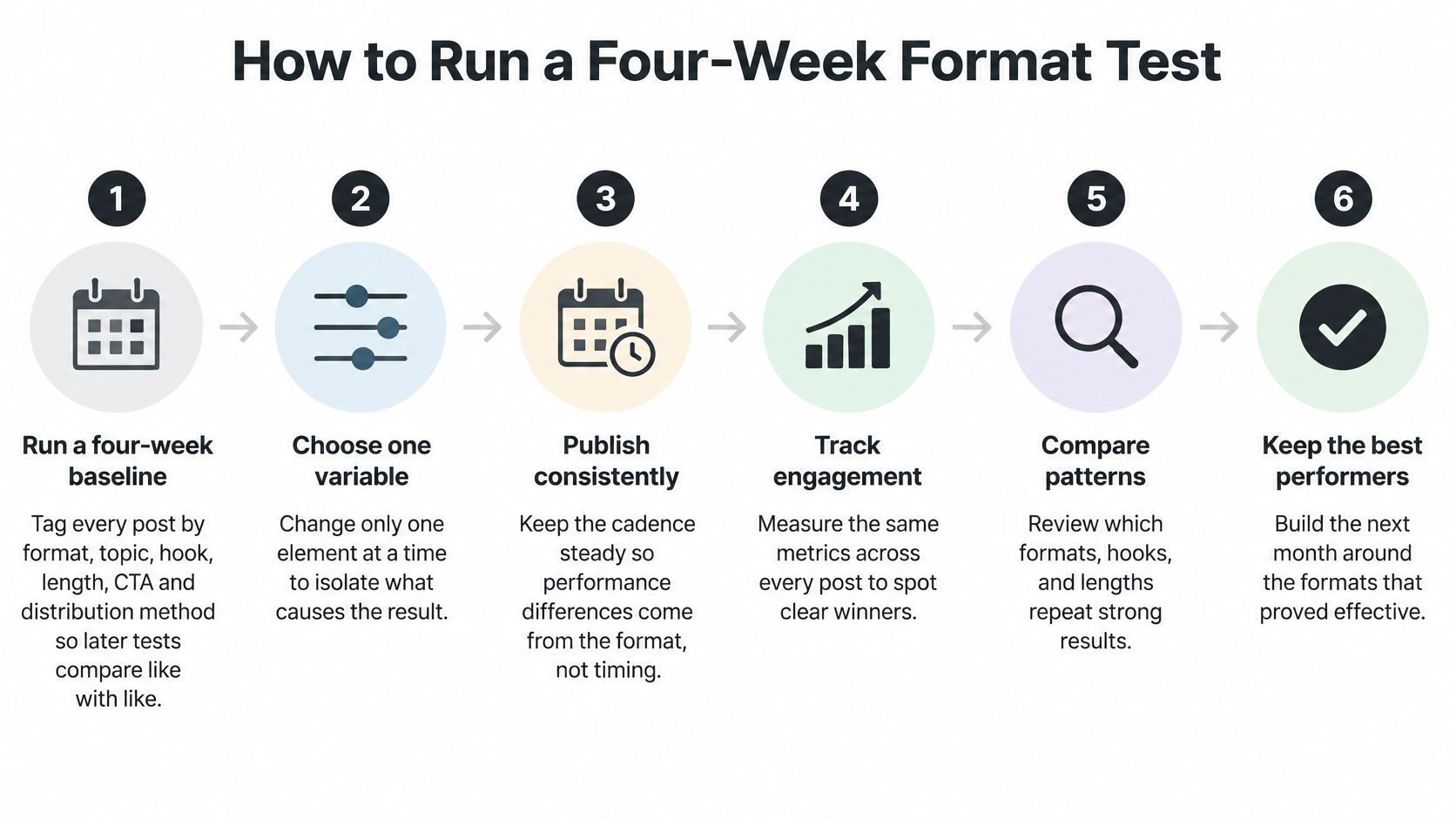
- Run a four-week baseline. Tag every post by format, topic, hook, length, CTA, and distribution method. Those labels let the team compare like with like.
- Choose one variable. Keep the topic and CTA stable, then change only the opening frame, editing rhythm, or format. Isolating a single change makes the result easier to interpret.
- Publish consistently. Keep the planned cadence steady through the test. Otherwise, timing or volume can muddy the comparison.
- Track engagement. Calculate engagement as interactions divided by followers every time, and separately record saves, shares, profile visits, and follows per reach. Consistent definitions make the numbers comparable.
- Compare patterns. Review which formats, hooks, and lengths repeatedly meet the chosen goal. One strong post isn't enough to establish a pattern.
- Keep the best performers. Move repeatable winners into evergreen or recycled schedules. Don't reserve a recycled slot for a cell based on one post alone.
A large benchmark dataset covering 67.5 million posts from 579,000 Instagram brand accounts found that brands averaged 8 Reels, 7 images, and 5 carousels per month in 2025, with Reels volume up 33% year over year, according to Socialinsider's Instagram benchmarks. Treat that mix as a starting cadence to test, not a universal optimum.
The definition of engagement changes the result. The same benchmark reports a 0.48% average using likes and comments divided by followers, while creator-focused datasets may report higher rates when they include saves and shares or cover smaller accounts. Compare test cells with the same formula and your own baseline, then promote only winners that repeat across a sufficiently useful sample.
FoPost can help teams keep account-specific drafts and publishing schedules organized while they run a controlled test. The test still needs a clear owner and consistent labels, especially when several people publish for different accounts.
After the team has tagged the posts and set the baseline, use the video below as a visual walkthrough of the testing process.
Repurpose Across Networks Without Losing Originality
Duplication copies the same caption and clip everywhere. Transformation adds something useful for the audience on each network, such as a new argument, a concrete example, a different visual structure, or a sharper opening. Reposting may save production time, but it doesn't automatically give a new audience a reason to watch or share.
Instagram leadership has emphasized shares, watch time, and likes per reach as useful signals, and the platform has worked to favor original creators over aggregators and copied content. Recommendation eligibility also doesn't guarantee distribution, as explained in this discussion of Instagram's algorithm in its own words.
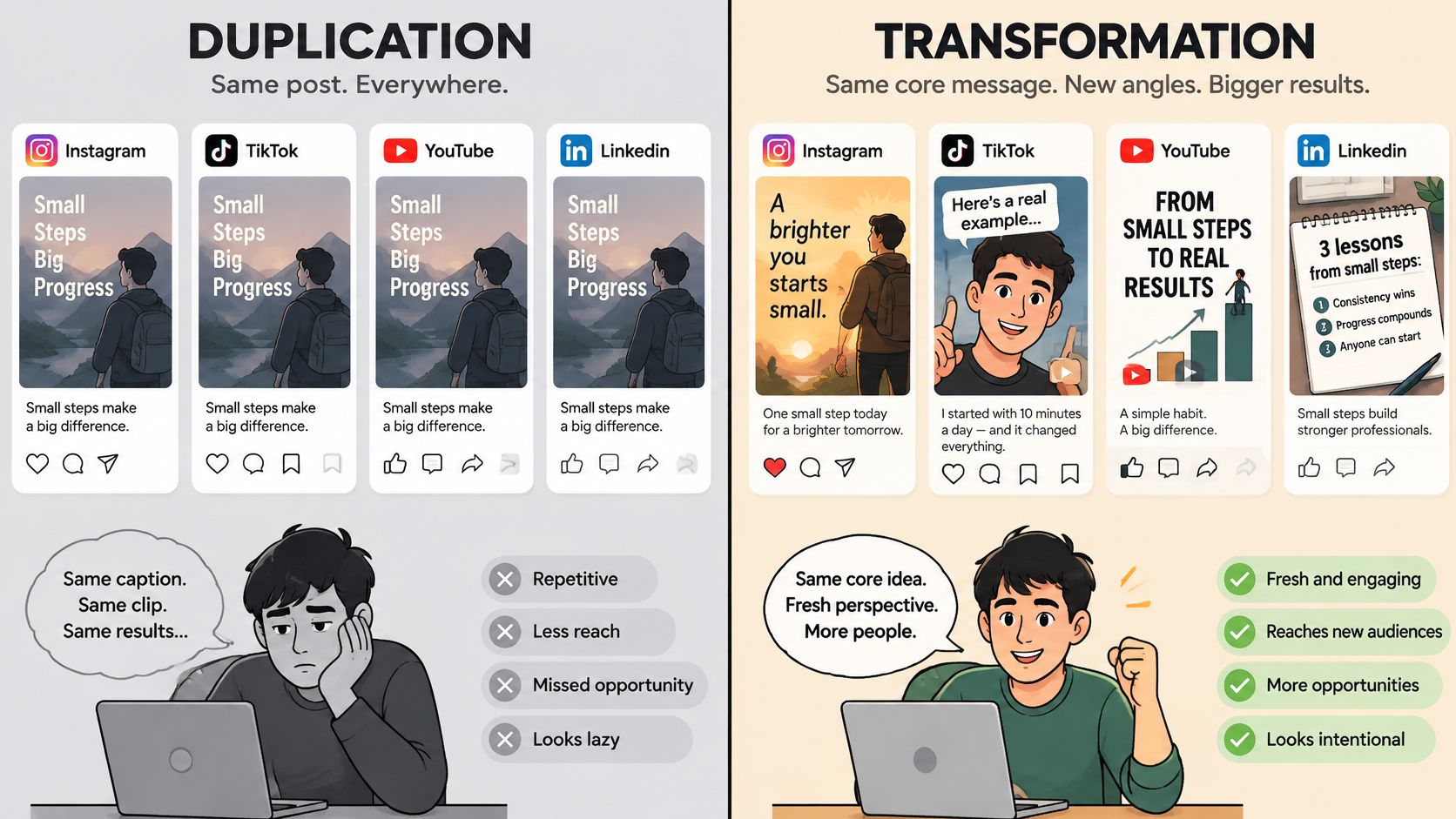
Consider a product comparison originally written for LinkedIn. For Instagram, turn it into a carousel with a new worked example and a first slide that states the result. For X, shorten the argument and end with a question that invites replies. The shared idea stays recognizable, but each version has a distinct shape and a reason to exist on its network.
Two measures are more useful than likes alone when assessing these adaptations: average watch time for video and sends per reach for shares. If a version earns views but people leave quickly, revise the opening or pacing. If it gets watched but rarely sent, make the takeaway more specific or useful to someone beyond the original viewer.
Teams that need help with the editing choices can review this guide to adapt clips for cross-platform posting. FoPost's platform-aware rewriting and review-before-publishing workflow can help produce and check network-specific versions before they go live; its cross-posting workflow supports adaptation rather than requiring the same post everywhere.
Treat repurposing as editorial adaptation. Keep the source idea's distinctive value, and measure each adaptation as a new post.
Publish at Scale Within Instagram Publishing Limits
Bulk scheduling needs a separate limit check for each Instagram account. Meta's Content Publishing documentation sets a rolling 24-hour cap on API-published posts, and the figure that applies can differ by account type, API version, and publishing method. Confirm the current limit for each account in that documentation before sizing a batch, because the number that governs one account may not govern the next.
This is also where volume discipline matters. An account that publishes close to its ceiling every day gives each post less room to earn reach, so the cap is a constraint on scheduling, not a target to hit.
Track each Instagram account separately rather than metering only across the whole workspace. Leave room below the relevant limit, and pause a batch when an account's usage gets close. That prevents one busy brand from disrupting another account's schedule.
Group calendar items by account and time zone, and review each draft before release. Keep captions native to Instagram rather than carrying over text written for another network. For practical context on daily Instagram posting limits for creators, compare the guidance with the publishing method and account setup in use.
FoPost lets users connect the accounts they use and pick any set of them for each post. That helps a team direct a scheduled batch to the intended accounts rather than sending every post to every connected profile.
Where the publishing API in use exposes a usage readout per account, pull it before scheduling and again before release. Run the batch only after both checks pass: the documented limit confirmed for that account, and current usage comfortably below it.
Start Your Four-Week Baseline This Week
- Export the last 30 days of reach, non-follower reach, saves, shares, profile visits, and follows for each account. Fill the results into the funnel table.
- Tag the next 12 posts by format, topic, and hook. These labels give the baseline enough structure for useful comparisons.
- Choose one format test and one funnel stage to improve this month. Change one variable at a time.
- Schedule a review for day 28. Compare each test cell with the baseline, not with an industry figure.
Reporting across several accounts can take as much time as publishing. Put each account's export in one sheet with identical column names, so the team can compare the same test across accounts and identify which account moved. FoPost's analytics can show follower and engagement trends over a selected range, either per account or combined, which helps keep the reporting view consistent.
Today, export the last 30 days for one account, fill in the baseline column, and schedule the first tagged post.
Use FoPost to schedule and publish to major networks from one place, with AI assistance for adapting drafts and developer APIs and SDKs for teams building their own publishing workflows. Start your next format test with a cleaner process by visiting FoPost.